Categories
Assignment 5

Assignment 5

For my 5th assignment, I decided to use Gephi to graph my own dataset, flights in the US. The data originated from the index of complex networks from the University of Colorado. A list of airports and flight information, to the naked eye, is overwhelming. With thousands of lines of information about millions of flights, making sense of the information in that form is challenging. This is why Lima says that network visualizations can be a “visual decoder of complexity” (Lima 80). It allows you to immediately distinguish some “central players”(Graham 234) in the network, or in this case some of the busiest airports.

Initially, I put all the airports in the database on the map and decided that provided a visualization that was far too hairball-ish for my tastes, so I revised it.
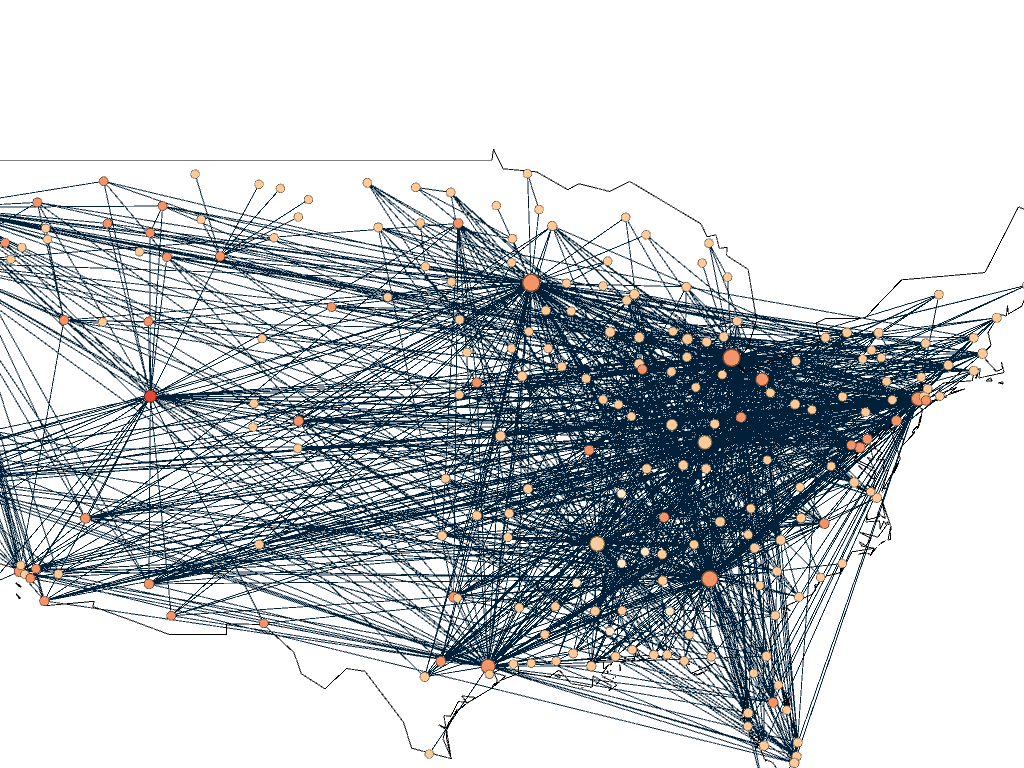
Gephi map with all airports plotted

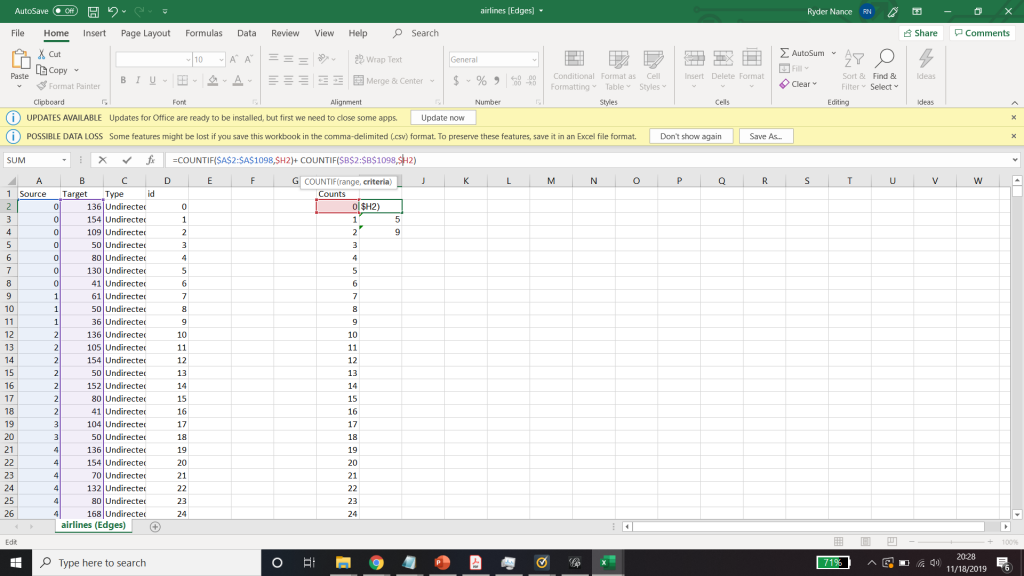
I needed some form of what Lima would call “classification” which “applies the hierarchical model to show our desire for order symmetry and regularity.”(Lima 25) I decided to filter to the five busiest airports and plot all the flights coming out of those airports, and their final destinations, or in other words, classify by degree. I did this in Excel, because I wanted to be able to render the final image in the preview window rather than taking screenshots. After doing this, I discovered little to no improvement by cutting down to five airports, as can be seen below. To determine which airports I should include, I used a counting function in excel to determine how many connections each node had, and then cut out all the nodes that did not connect to those five.
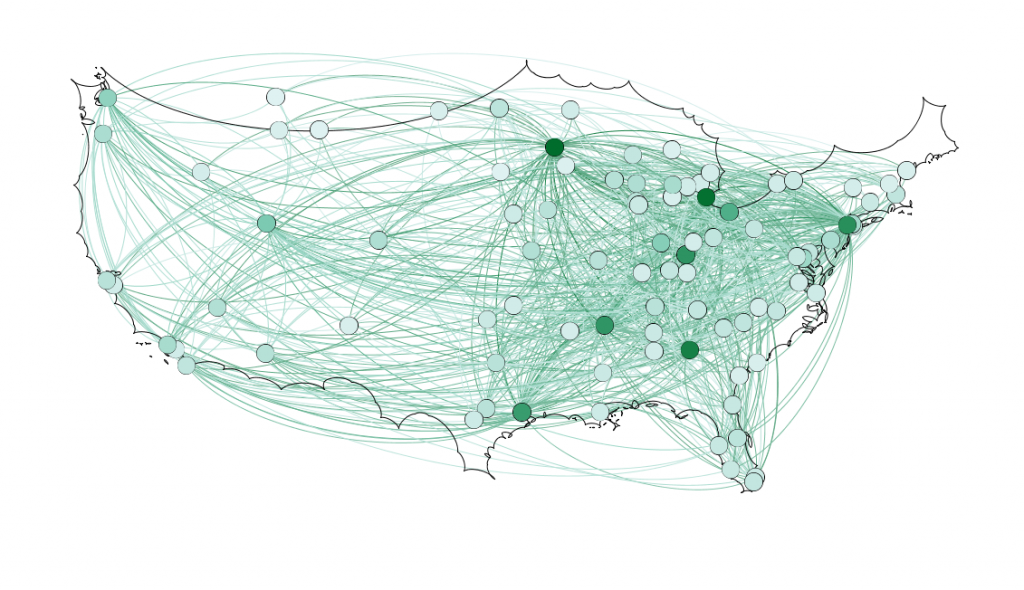
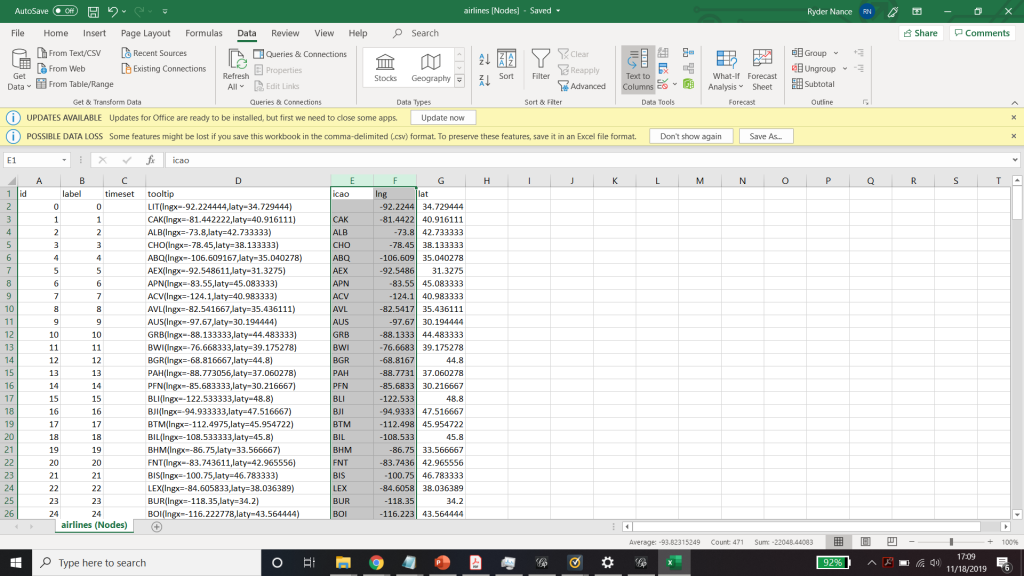
Figure 1. First render of US Flights

Because 5 was still too broad, I decided to filter down to 3, and I also had to condense some of the large airports that I wanted to show in order to be able to display them all. For example, I condensed the 3 DC airports (DCA, BWI, and IDW) into one location, to avoid clutter. These airports are so close together anyway, that they fall under the same ATC system (the DC SFRA to be exact) and require the same clearance. The same is true of the major 3 airports around New York City. I again utilized Excel to do this, as its text processing commands are powerful and relatively easy to use. Also, I again had issues getting the filters to work in Gephi. Additionally, the filters did not seem to be compatible with the mapping plugin for Gephi. If you used any kind of filter, the map disappeared.

Next I calculated the modularity and degree for the network. I used the built-in statistical tool in Gephi to make these calculations, and determined that the average degree was 2.05, and the modularity was 0.965. The modularity has a relatively medium value because, although there are many connections between the high-degree nodes, there are also many nodes with a degree of one. As Graham says “Modularity is successful when there’s a high ratio of edges connecting nodes within any given community compared to edges linking out to other communities.”(Graham 229) In this case, the edges linking to other communities are flights to smaller airports, while the links within the community are to the high-degree airports, Chicago, New York, Florida, Seattle, and Dallas.
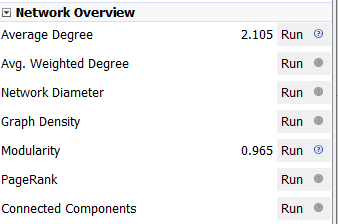
Gephi statistical calculations

To display the map, I used the “map of countries” plugin for Gephi. In order to make it functional, I went through and provided the latitude and longitude of each airport in question.

One of the most interesting realizations from this data, for me, was the placement of the routes vs the Victor Airway map. In the US, commercial and general aviation traffic follow what are called Victor airways (which are essentially highways in the sky). They are directed between airports and radio navigation fixes. The map that I created very closely resembles this. For reference, I have included a screenshot of a small portion of the Victor Airway map, just the portion centered around Chicago Midway airport (KMDW). The full map is far too complex to be visible in a screenshot. The black lines are the airways and the blue circles are the class B and C airspaces around the airports.
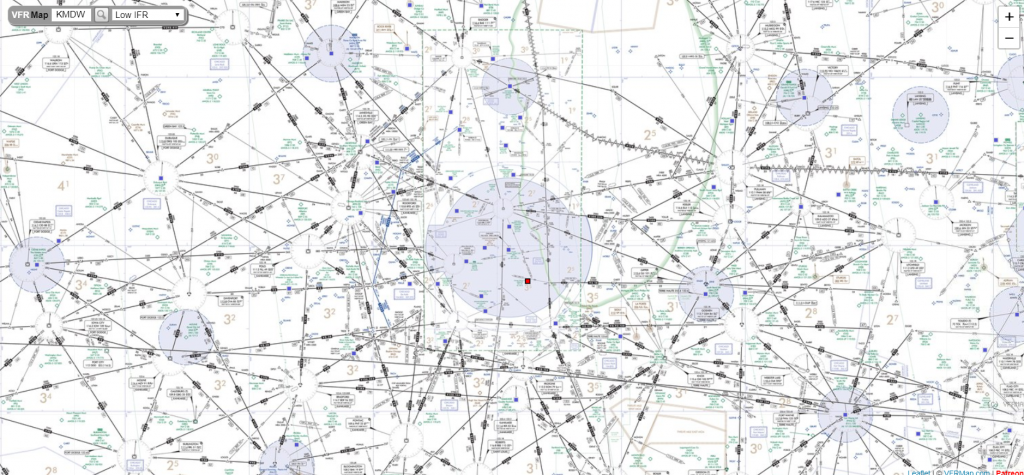
Victor airway map centered around KMDW ( http://vfrmap.com )

Finally, as for my opinion of Gephi, it was not my favorite tool to work with. As with many of the other open source tools that we used, frequent bugs and issues with a distinct lack of documentation were frustrating. Additionally, I found the included coulour pallet used was lacking, and was not as easy as tableau to change. However, when it worked, Gephi was easy to interact with in order to arrange the nodes in a way that looked good. I was never able to get the Data Laboratory panel to work, so I was unable to assess its helpfulness. However, despite the Data Lab not working, it was easy to import new spreadsheets so when I needed to make a change I would just change it in Excel and then re-import it. Gephi was not as easy for the coordinate driven data, as it was not originally designed to work with map data. The plugin worked, but required a great deal of “data plumbing” behind the scenes to get it functional.
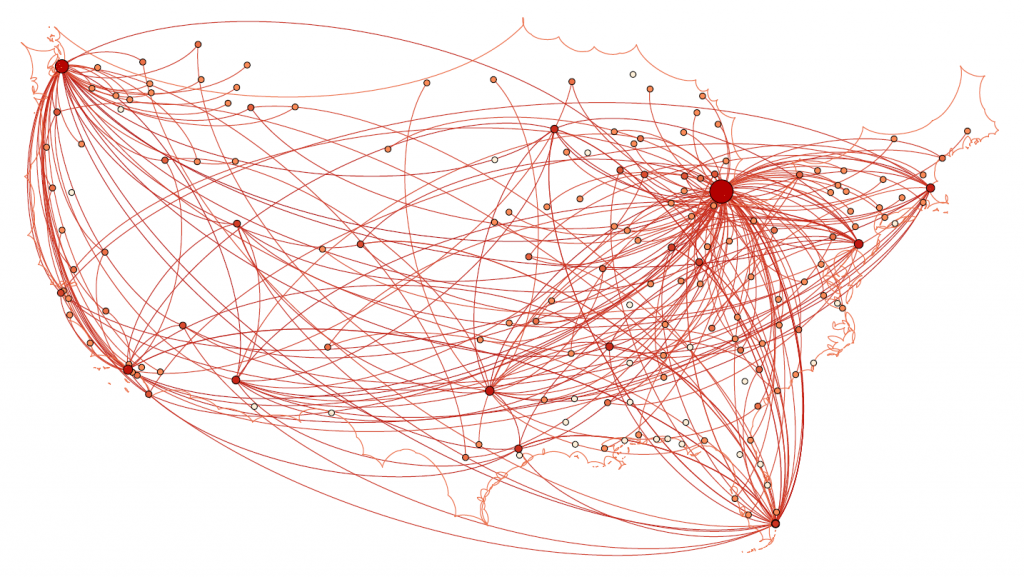
Final map render

Unfortunately, after many hours of toying, I was unable to get the preview tool to work properly and had to revert to using the snipping tool to get screenshots of the visualization in the overview tab which can be seen above.
Categories
Assignment 3

Assignment 3 Ryder Nance

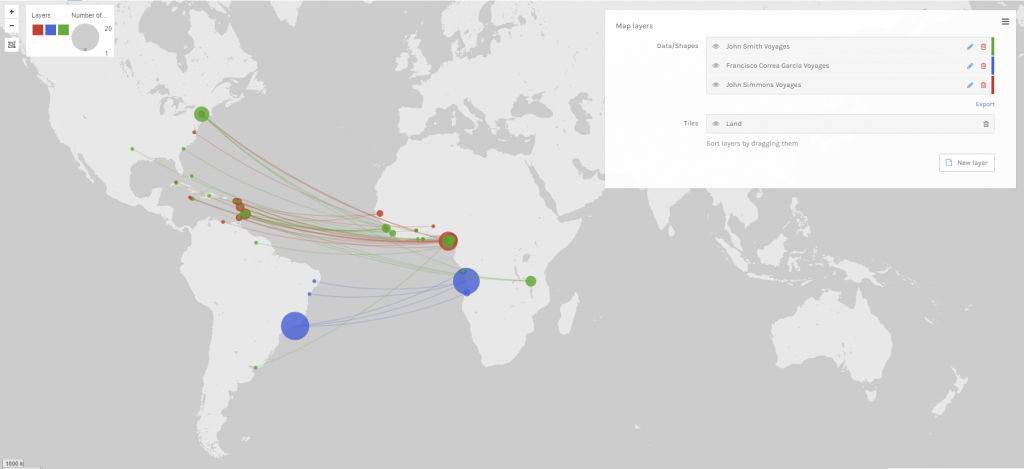
For my first visualization, I utilized Palladio and the transatlantic slave voyage database to map the paths of the 3 most active ship captains. Achieving this result required quite a bit of plumbing, as I had to do a great bit of manipulation to make the same rows and columns appear as 3 separate layers on the map. Another challenge was the many duplicate names that I discovered. When I initially sorted by captain name, I found that one of the most common names is William Williams, with 25 trips. However, upon closer inspection, this individual made trips starting in 1725 and ending in 1808. Given the life expectancy of people in that time, especially those at sea, this seemed suspect. I looked closely at the dates and determined that there were effectively three ~10-year ranges for William Williams, suggesting that there were actually 3 captains sharing that name. To fix this I went through the list and broke up all of the names that seemed to have duplicates, and then picked the top 3 names after duplicates were separated.

Voyages of the 3 most active captains of slave voyages. Location data is inferred from location name. 

The three different colors represent the 3 captains that are mapped and the size of the dots represents the number of times that they landed at the port. The trips are mapped with the starting location being the place of slave purchase and the ending location being the place of slave landing. This visualization did not provide much insight into the data, as I did not see any trends that warranted further investigation. So after this, I moved on. I included it because I thought it was intriguing. 

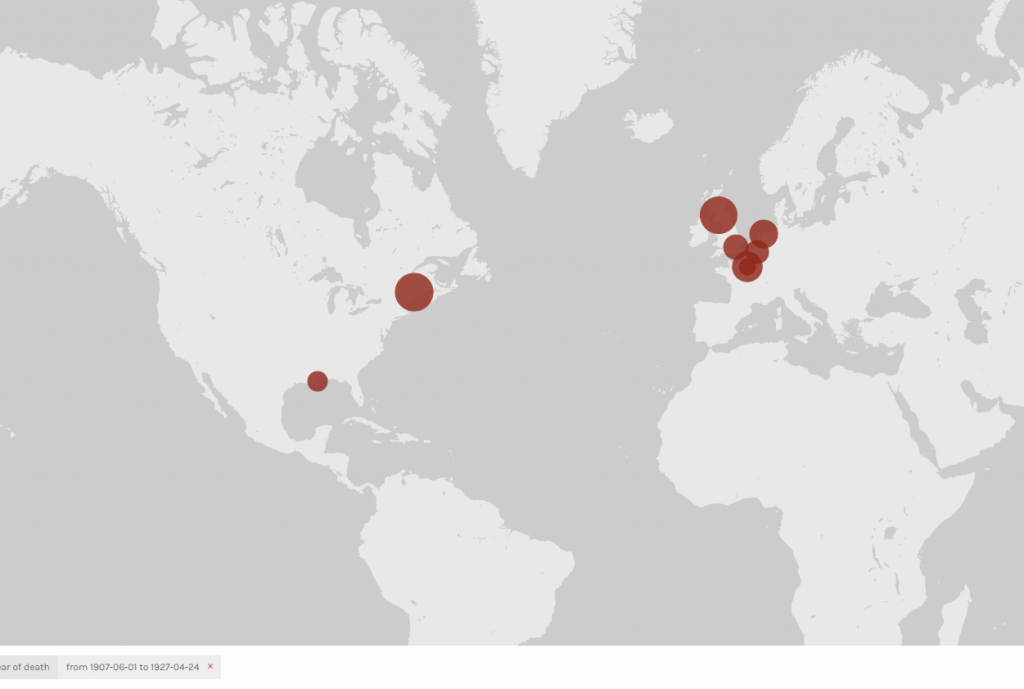
Deaths between 1907 and 1927, with the dots sized according to the average life expectancy of the location of the center of the dot. Data is sample data from Palladio.
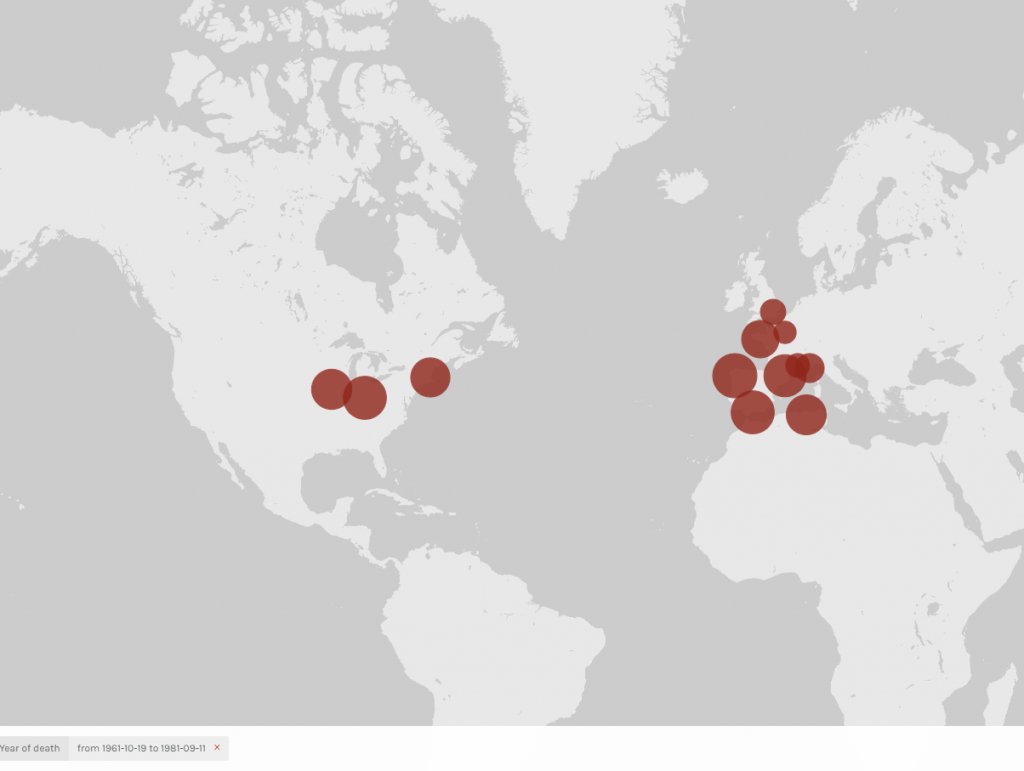
Deaths between 1961 and 1981, with the dots sized according to the average life expectancy of the location of the center of the dot. Data is sample data from Palladio.
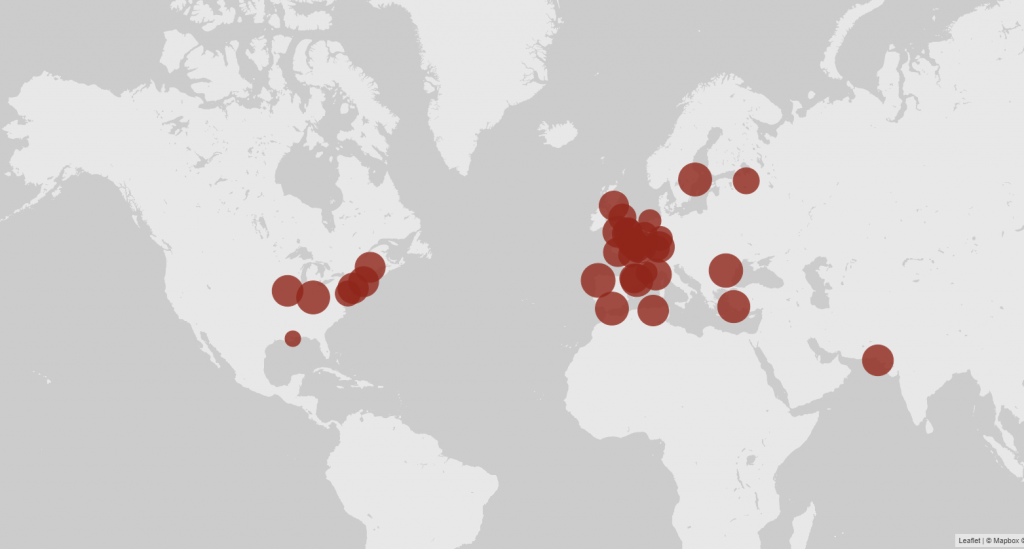
 A look at the overall average for all of the locations in the dataset, through all years, with the dots sized according to the average life expectancy of the location of the center of the dot.  Data is the sample data from Palladio.

For the second visualization, I mapped the average lifespan of people based on their location, utilizing the sample database inside of Palladio. The dots are sized based on the average lifespan and centered on the respective location. The timeline at the bottom was used to isolate different time periods for comparison. This visualization also required quite a bit of data plumbing, as Palladio only allows the sizing of dots based on the sum of a count, not the average. To get around this, I had to use excel to calculate the partial average so that when Palladio summed it up, the average was accurate. Once the visualization was set up, I noticed a few patterns. I took two different images from different 20-year periods. Between those two periods was a noticeable difference in the size of the dots, indicating that as the years progressed the average lifespan increased. I looked into some of the possible reasons why this could have occurred and discovered multiple major accomplishments in the medical world that could have affected the lifespan of people. Many of these advancements were made by American physicians and scientists, which may explain why the dots in the US are slightly large on average than in Europe (with the exception of some of the larger cities in Europe).  In order to take a closer look at this, I created a timeline in Timline.js. 

The timeline shows some of the medical advancements that could account for the difference in lifespan.

Drucker’s principal argument is that visualizations are all misrepresentations or “reifications” of information, that are passed off as verbatim presentations. The layer of abstraction and methodology of said abstraction performed by the author or artist is not always shown. I believe this is true. Often the viewer or reader is given a visualization that could be interpreted as truth or fact. The design information that would lead the reader to see and consider the bias of the designer is often omitted or hidden, thereby obfuscating important information. For example with the first visualization that I created, there was a tie for 3rd most active captain. I chose at “random” between the two. Additionally, the latlong data that was used for all of the locations came from a plugin for google drive. Some of the information is inaccurate. At the bottom of the diagram I chose to indicate that I had done this, but I easily could have. If that were the case, a viewer would not know that I manually went into the data and changed locations labeled London from a location in the US to London England. While this is most likely correct, a viewer does not know that I went in and changed that. While I don’t believe I introduced any bias by doing this, I have a western knowledge of geography, which could affect how I fixed the data. 

Categories
Assignment 2

Assignment 2 – Tableau & Voyant

I used the 1806 Slave database, the slave voyages database, and the African names database to create six unique visualizations to showcase important information that might otherwise be hidden, especially if one were to use a close reading method. The African name database and the 1806 Slave database both required a significant amount of “data plumbing” in order to move them into a state in which they can easily be visualized. With both of those visualizations, manual data modification was necessary to match the entries in Tableau to a physical location, because some of them were unknown or, in the case of the African names, they were locations that have changed names or no longer exist. 

Voyant

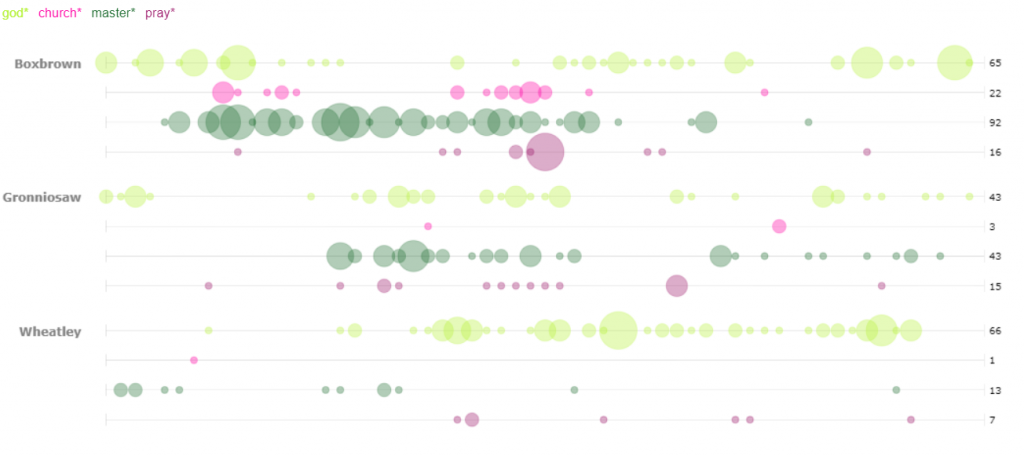
For my first visualization in Voyant, I decided to use the bubblelines tool. I used the keywords God, Master, Pray, and Church. These were plotted for several of the stories across the length of the story. I was not surprised by the small correlation between the usage of God, Pray, and Church. However, I was surprised to see that many of the occurrences (not necessarily the high density occurrences) of the word “pray” were also closely accompanied by the word master. Looking deeper into the texts I only found one example of an explicit prayer for a master, however the singular existence leads me to wonder if many of the slaves in these narratives prayed for their masters. I was also struck by the minimal usage of the word “master” in Wheatley as compared to one of the other two narratives, particularly Boxbrown.

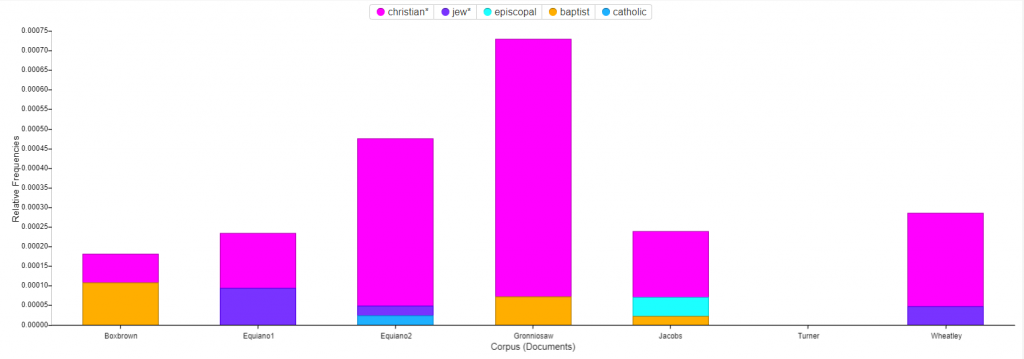
For the second Voyant visualization, I was interested to see a breakdown of the religions mentioned in the narratives. The stacked graph easily portrays the dominance of Christianity as compared to the rest. I was puzzled by the fact that Turner has no mentions of religion at all in their story. In order to find mentions of the various religions I utilized two methods. The first was brute force guessing of many of the common religions which yielded all of the entries shown except for one. In order to find that one, I used a word tree centered around the word “Church”. With a wide context setting I was able to see all of the religions that I had found by brute force in a neat list, along with the additional entry that I had not considered, Baptist. 

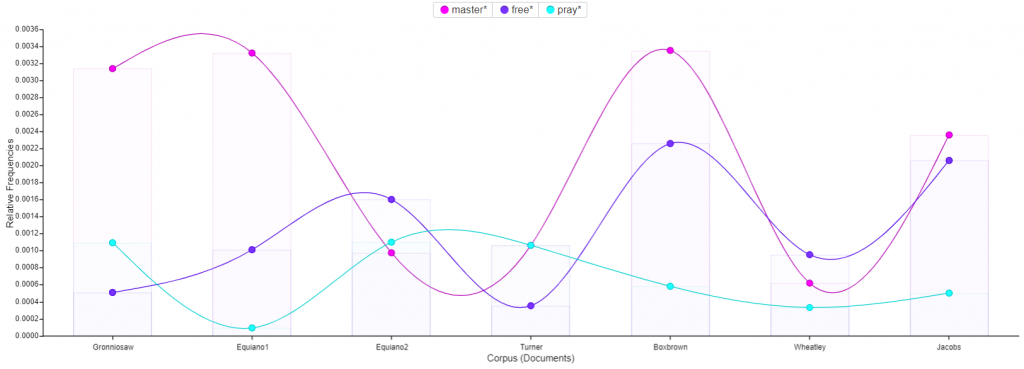
Next I utilized the trends tool to track the usage of the words : master, free, and pray across the corpus. The most interesting find from this visualization was the small inverse correlation between the usage of the word pray and the usage of the word free. For several of the texts, one of the two words has a high frequency and the other has a low frequency. This could suggest that slaves who talk more about freedom pray less, or conversely slaves who pray more talk less of freedom. 

Tableau

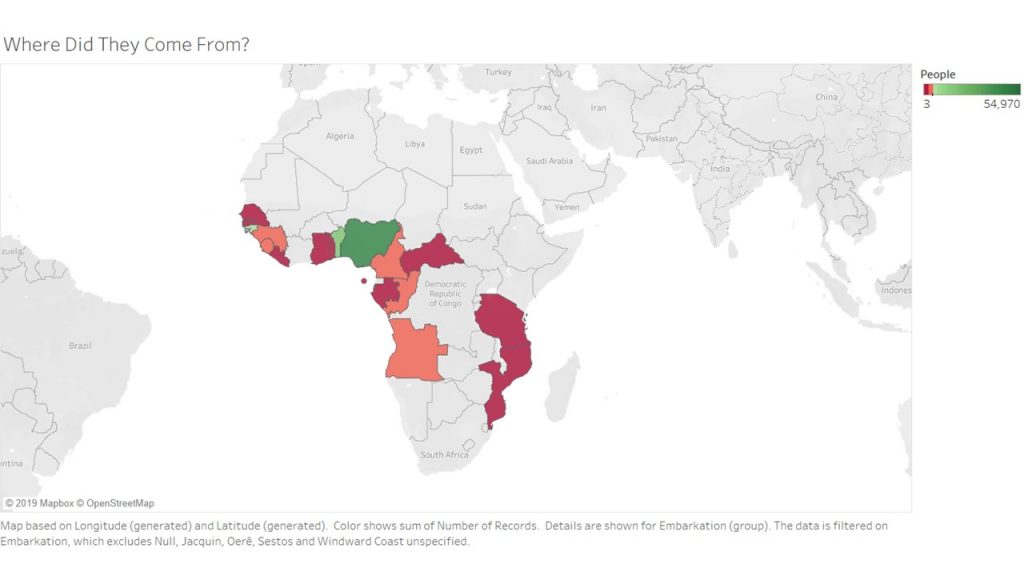
For my first Tableau visualization, I mapped the embarcation locations of the slaves. The countries are highlighted to indicate where people came from, and colored to indicate the number of slaves who came from the area. This visualization was tricky, because I had to do quite a bit of research to match some of the old African countries and regions to their modern day locations. There were several locations that I had to filter out entirely because they did not produce any results when searching for them.  After that plumbing was complete however, the visualization shows the fact that many of the slaves come from the coasts of Africa. Considering they traveled by boat, this makes sense. 

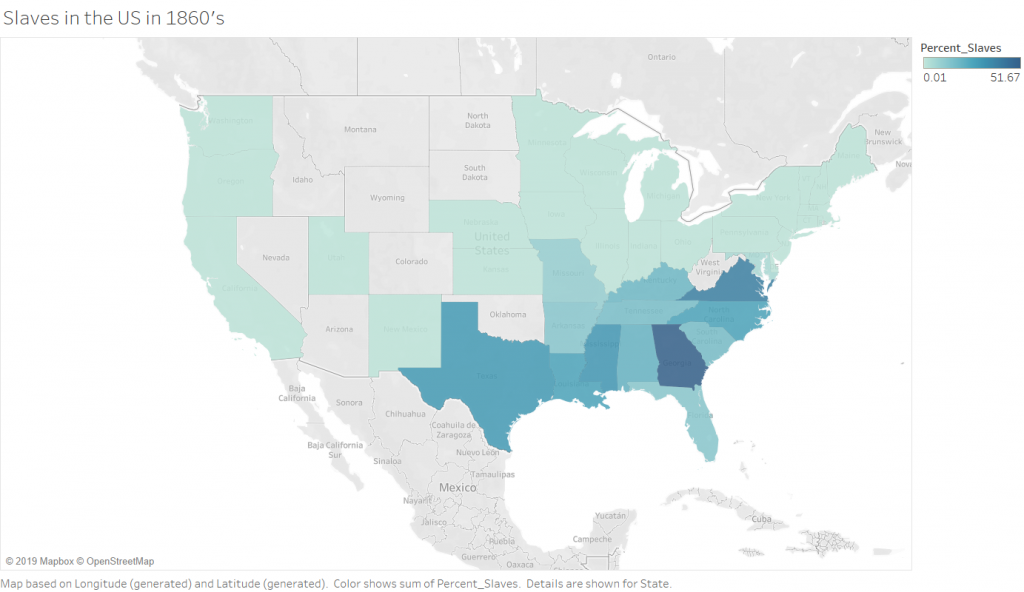
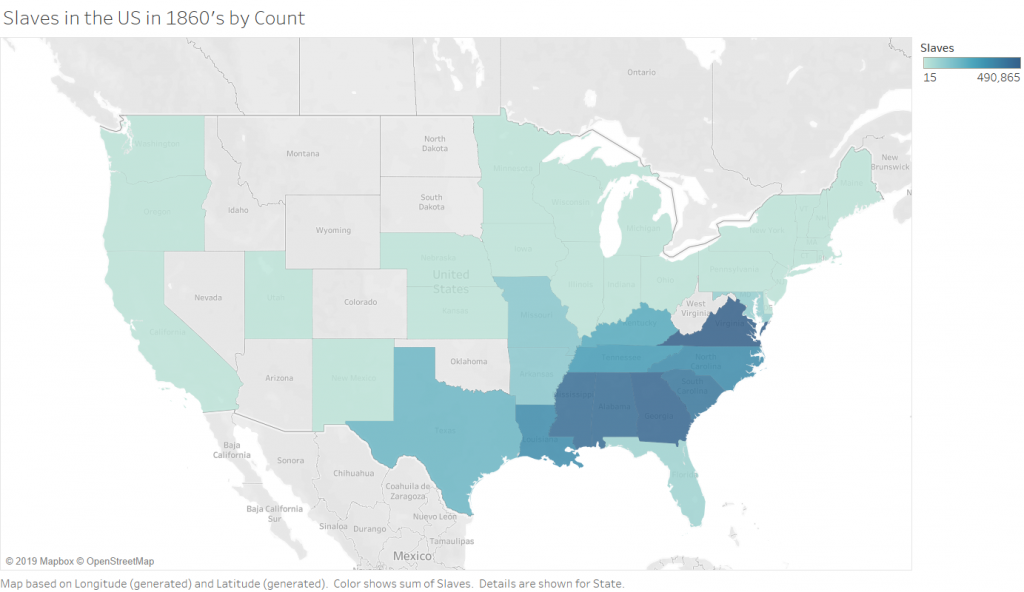
The Second (2 maps) visualizations in Tableau are 2 maps of slave populations in the united states, which I have broken down by state (I chose state over county purely for aesthetic reasons, and because this choice did not impact the ability to show the story that I wanted to show).  Comparing the two maps leads to the discovery that not all of the locations that have the most slaves also have the highest population of slaves. There are a few states that are outliers and have smaller numbers of slaves but a higher percentage. There are, of course, still some states (Virginia and Georgia) which are high in both raw number and percentage. This visualization allowed me to play with the calculation feature of Tableau, which is incredibly powerful because you can write equations to format your data into any form you need.

Percentage of Slaves in the 1860’s by State

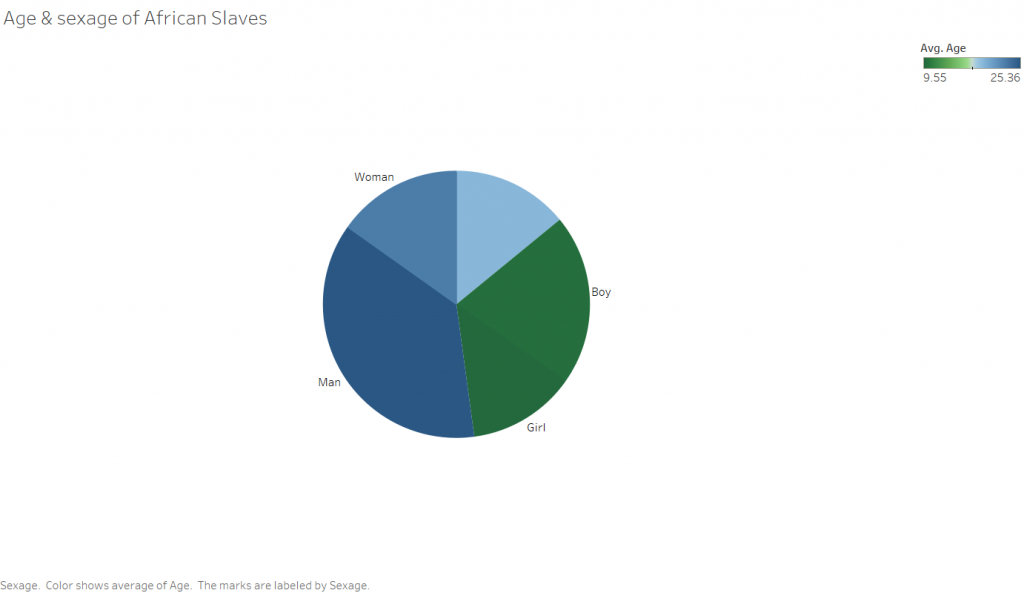
The third rather simple Tableau visualization is a pie chart showing the sexage of the slaves. The angle of the slices is determined by the number of people in that particular sexage, and the color corresponds to the average age. I was surprised with this visualization that there were so many records missing for sexage. This leads me to wonder how this data was collected, and ask why someone didn’t simply makeup a sex for the unknowns as I would expect to happen in a situation where someone has to enter a large amount of information into a database of some kind, be it a paper one in this case or a computer in modern days.

Between the two platforms, I certainly prefer Tableau. Both programs are able to take in data and output visually appealing representations of the input, however Tableau is far more customization. This does not provide the full picture however. The two are designed for completely different purposes. Tableau excels at visualizing numbers and quantitative data that characterizes something qualitative, such as the number of individuals who are male or female. Tableau does not do a very good job with qualitative data such as text. That is where Voyant comes in. Voyant is excellent at analyzing corpuses of text and breaking them down so that you can get a “zoomed out view”, or a quantitative view of something qualitative. Tableau’s “Show Me” pane makes easy the process of determining what type of visualizations are available to depict the story you are trying to tell about the data. This is especially helpful if you have a pattern that you want to show, but are not sure how to show it. While Voyant does not suggest the types of visualizations that would work for your particular data, it does allow you to quickly play around with all of the tools in its arsenal, allowing you to get an idea of they tool’s capabilities relatively quickly. 

The ability to step back from a dataset and visualize something about it as a whole is incredibly powerful, and only made more powerful with tools that allow for quick and easy close analysis of a phenomena found in a distant reading. The example I would propose for this (though not related to DH in the least) is in the form of a lateral thinking puzzle I recently read, which asked why a corporate database was analyzed to find that a customer was four times as likely to have their birthday on any of the following days than on another : February 22nd and November 11th. This would be the distant reading of the dataset, finding the significant phenomena that so many customers have birthdays on certain days. The closer reading finds that the dates, entered in numerical format are “11-11” and “2-22”. The store clerks were simply lazily punching numbers into the system rather than asking customers for their birthdays. Without a closer reading of this problem, one could form the conclusion that those are lucky days to have children, and indeed it is more probable that a given person will have their birthday on one of those days. The closer reading here provided the reasoning behind the phenomenon. This ties into Tanya Clements work, in that she suggests that the DH gives wide perspectives that are necessary to be able to grasp new and important information about texts. She also talks about the balance provided by close reading techniques. 

Categories
Assignment 1

Assignment 1

Visual Complexity

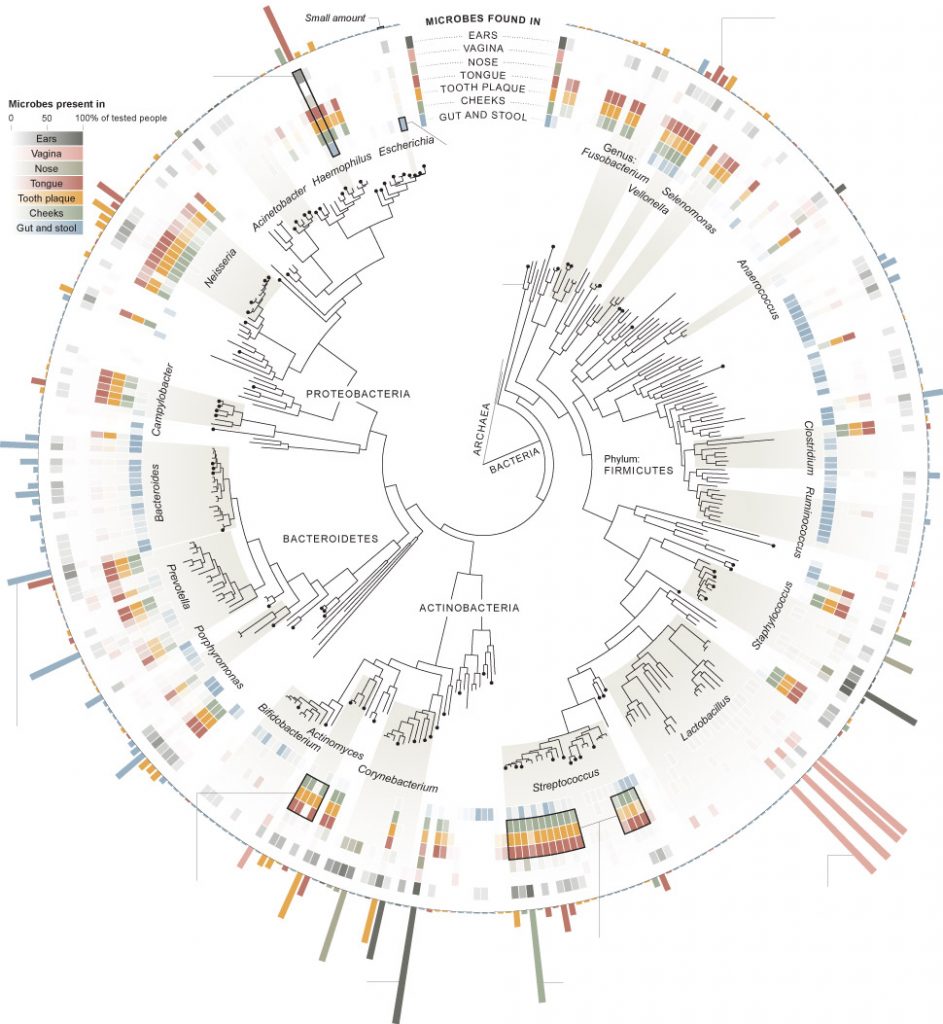
My first visualization, from the New York Times,  analyzes the “invisible population” or the bacteria that live in different bodily sites on the 242 people tested. I chose this one initially because it visually appealed to me and I generally tend to like the graphics produced by the New York Times. In Design for Information, Meirelles discusses studies that show that different people are drawn to different “visual features.” I was drawn to the radial coloring and the inner ring resembling a gauge from afar. Though I may not have been initially interested in the precise breakdown of bacteria on a human body, the graphic caught my attention and caused me to take a closer look. Using compelling graphics to gather the attention of a reader is a technique that would be familiar to W.E.B DuBois, who “ produce[d] modern graphs, charts, maps, photographs, and other items that appeared to sparkle” in order to grab people’s attention because “an array of dry displays at the exhibit would have been ineffective in subverting the social Darwinist paradigm.”(DuBois 34) DuBois was trying to grab the attention of the masses (not just “a small circle of academics”) in order to “Chronicle the African American experience”(DuBois 34), while the New York Times is simply trying to get readers to turn to section D1 of the June 19th edition of the Times. Similar tactics, just different audiences.
Though represented radially, the hierarchical structure of the diagram resembles the “classification” type tree diagram as described by in Visual Complexity Mapping Patterns of Information:  “Classification(a systematic taxonomy of values) …applies the hierarchical model to show our desire for order symmetry and regularity.”(Lima 25)

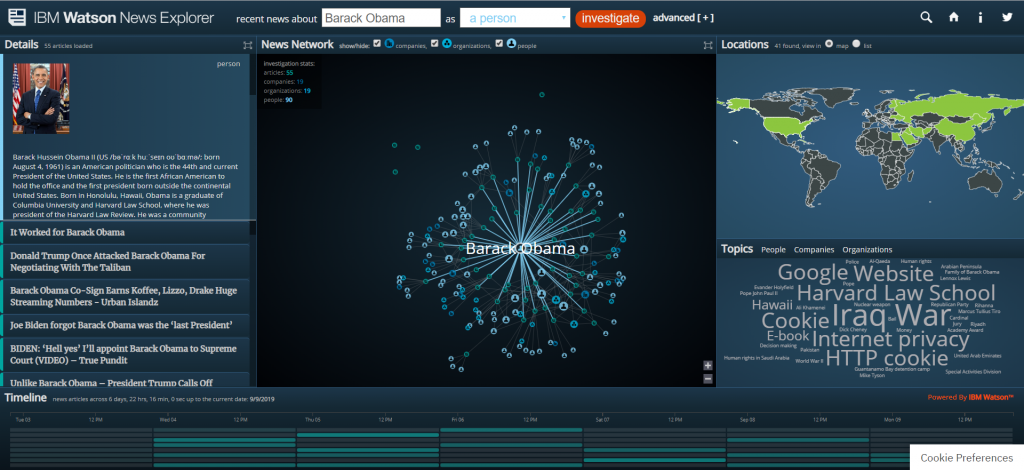
My second visualization is the IBM Watson News explorer which indexes thousands of news articles per day and analyzes them for content in order to link them together by topic, location, and people involved. This visualization appealed to me because of the location map on the right side. The news explorer uses color as a “preattentive feature” (Meirelles 22) to draw the eye to geographic locations where the searched item is tied to. You can search for a specific term or you can use the topic wordmap to find popular topics. When you select a topic, ( I have selected Obama in the above screenshot) it then uses the same wordmap to show you the most used words in articles about the topic (Obama here) as well as a map of the usage locations, and what Meirelles described in Design for Information as a node-link diagram(Meirelles 55) to detail the interconnections between your selected topic and another, as well as a list of the actual source articles where all of the information is pulled from. 

The IBM visualization is clearly dynamic, as it pulls live data for recent news articles, while the New York Times article is static, it relies on the data taken from the study of 242 people, it never changes. 

While analyzing these two visualizations, I thought about the influences of bias that are discussed in Data Feminism. Invisible Populations is based on scientific data, so the largest source of bias there would likely be in how the information is actually communicated to the reader. However, with the IBM visualization is a little less clear. Going to the information section of the website reveals that the system indexes 250K articles per day from 70K sources. While one might believe that this eliminates bias, I am not sure. The source articles are arranged in a manner that is less than transparent, with articles from sites like “spin.com” and “truepundit.com” showing up with the same frequency as more verified articles from sites like “nytimes.com” and “CNN”. Because of this scheme, extremely biased opinion pieces can show up in the results categorized as news. Because the system is automated, there is no moderation. Additionally, you can search for individuals, and it will show you articles and information linked to the person. However as Data Feminism implies, what’s important in this analysis isn’t who’s in the system, but “who” is missing. The system can only display information on people that the media is reporting on. If there are no articles about the person online, then to system, they effectively do not exist. You can only see the stories of the people who get in front of the news. As Data Feminism says, “Who any particular system is designed for, and who that system is designed by, are both issues that matter deeply. “(D’Ignazio and Klein)

This visualization, as compared to the last one, does allow the consumer to interact with the data in multiple ways. You can click on almost any of the visualizations to display more information or to use that as a search criterion for a new search. The New York Times visualization only provides a single means of interaction. However, considering the fact that one was designed for print media and the other was designed for the internet, this is not surprising, and also not a downside of the New York Times piece. I believe both visualizations allow for new understanding of the material. The IBM visualization allows you to see the connections between different articles and stories that are happening, that you would not have been able to easily detect before. The New York Times visualization provides less new understanding, but it does neatly sum up all of the information about the human biome.

DH Sample Book

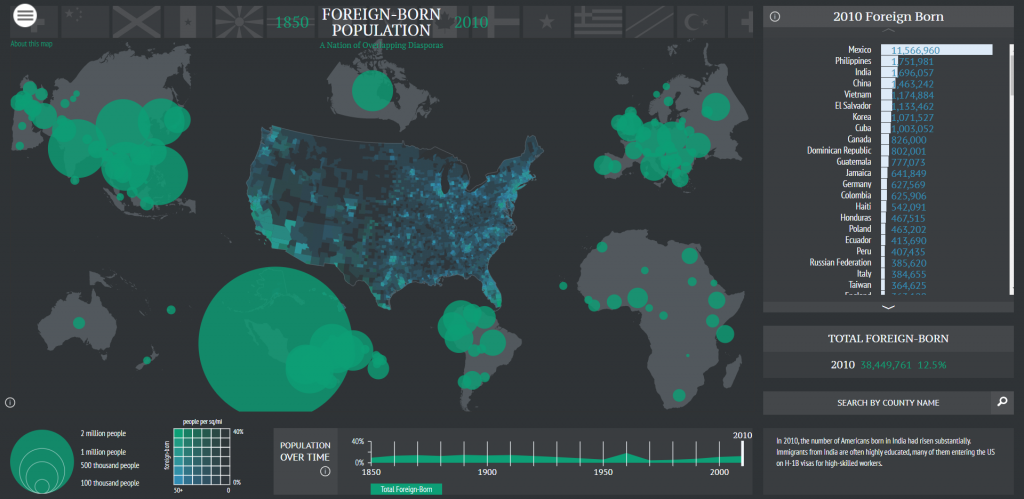
In the digital humanities sample book, I chose American Panorama, and the Six Degrees of Francis Bacon. American Panorama was compiled by the Digital Scholarship Lab at the University of Richmond. The project is a compilation of maps displaying information about the United States. The project is navigated by selecting a particular map and changing the parameters of it (each one is slightly different). The visualization allows the user to select from various criteria to change what the map displays. In the screenshot, I have the map of foreign born population. It allows the year to be adjusted at the bottom and then it shows where foreigners are from. You can even search by country on the right hand side. Information that this shows that a research paper would be unable to is the time element of the foreign population change. A paper would be able to discuss trends, and maybe even show a few years, but it would be unable to display the change over time in the same way that this can. The lab has a separate page that clearly lists the sources for the information. In terms of shortcomings, this project is pretty good. I think the main page could provide more information about the maps before you clicked on then, to give the reader more information about what they are about to open. The project was first created in 2015 (according to Wayback Machine) and has added maps since then. They currently have 8 maps. 

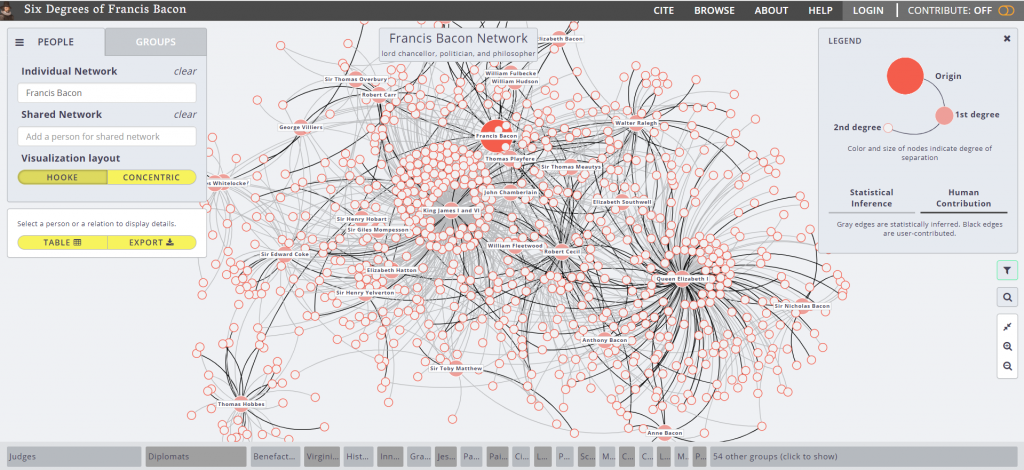
The second visualization is Six Degrees of Francis Bacon. The project is hosted by Carnegie Mellon University, with Christopher Warren as the project leader. The purpose is to recreate the “early modern social network”. The project is entirely open source, meaning that anyone can contribute to it. This is both good and bad. Like Wikipedia, this type of system means that data is generally correct and updated frequently, but it is often unverified. It is good for basic reference, but not for citing. This is also one of the shortcomings of the project, is the unverified nature of the data it uses. Over a traditional research paper, this project offers a dynamic dataset that is always expanding, and a level of broadness that can’t be discussed in a paper. One simply cannot communicate that volume of information in a traditional paper, however with this project it is easy due to the ability to navigate and view details on specific connections. I believe that this project does offer new ways of viewing this data. I had no idea the vast social network that existed in the days of Francis Bacon, and this project allows you to easily follow a trail of connections to new information. One other shortcoming of the project is the linking of people together. The legend indicates that a grey line means that the connection has been statistically inferred. This means that some of these could be incorrect due to shortcomings of the algorithm. Design-wise, I thought the project was very easy to navigate and was visually appealing, using  different sized dots to indicate the degree of the connection, a technique discussed by Meirelles for pattern recognition. 

Categories
Practice

Practice Blog Post 1

In today’s fast paced technological world, data visualization is extremely important. People spend very little time reading and taking in information; they have very short attention spans. Accordingly, it is important to have data literacy skills in order to properly interpret and question information presented to you. Quick passes are often not enough to catch important information. Knowing some basic data literacy skills can help spot misleading data quickly. Our discussions and reading this week alluded to the biases that can be present in data. In addition to biases in the actual collection of the data, biases can be present in the data presentation, misleading the consumer into false conclusions about the data.

We analyzed a few examples of poor graphics in order to examine the core principals that they violated. The two examples I examined are below.

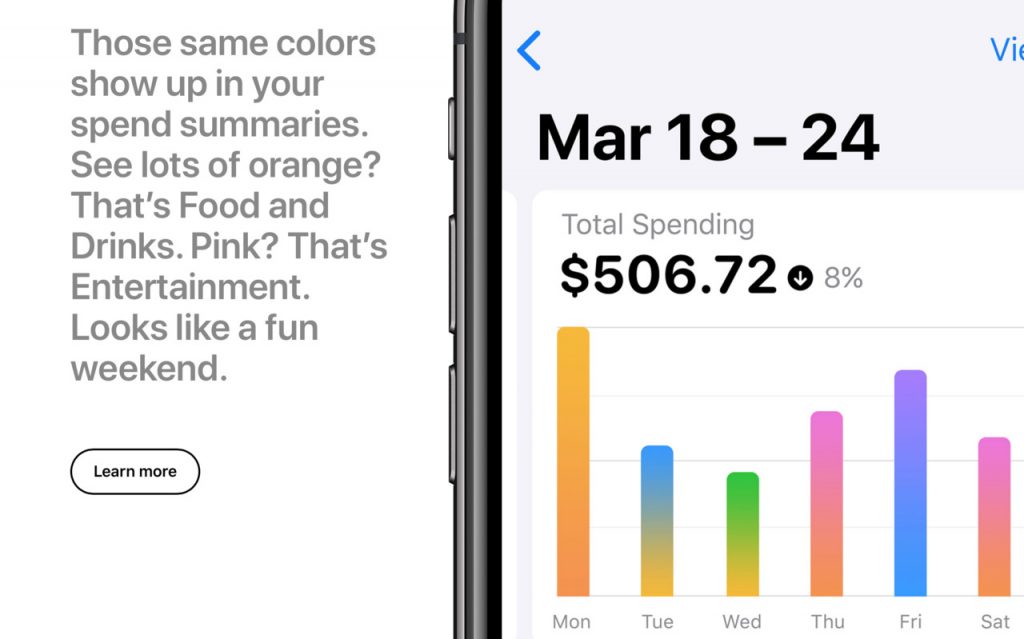
Apple graphic

This first graphic violates the principal about scale. They mention that orange is food and drinks and that entertainment is pink. However, they do not provide a scale. It is impossible to tell where orange ends and pink begins, they just melt together. The user essentially gains no information from viewing this graph. Also, while the relative magnitudes of the days can be seen, a lack of a vertical scale also makes it impossible to tell how much was actually spent. It looks like Monday ~2* as much money was spent as Tuesday, however it could be $1 vs $2 or equally it could be $100 vs $200.

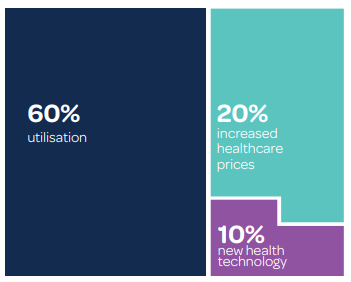
This graphic has major issues on all accounts. First off, besides the obvious typos, the numbers do not add up to 100%. There is a 10% segment that is not counted, which is misleading. Additionally, the block on the left is the same size as the two blocks on the right added together, however the block on the left is double the combined percentage of the two on the right. It should therefor be twice as tall. This violates the lie factor.