Categories
Assignment 5

Assignment 5

Networks show relationships between everything and everyone. Lima believes that “network visualization can be a remarkable discovery tool, able to translate, structural complexity into perceptible visual insights aimed at a clearer understanding. It is through its pictorial representation and interactive analysis that modern network visualization gives life to many structures hidden from human perception” (Lima 79). Using Gephi to analyze a dataset, one is able to take a group of people, and highlight the connections within the group through their common attributes. The goal of using Gephi in this way is to create a network visualization that clarifies the group and bring new information to light, that is difficult to find on a spreadsheet.

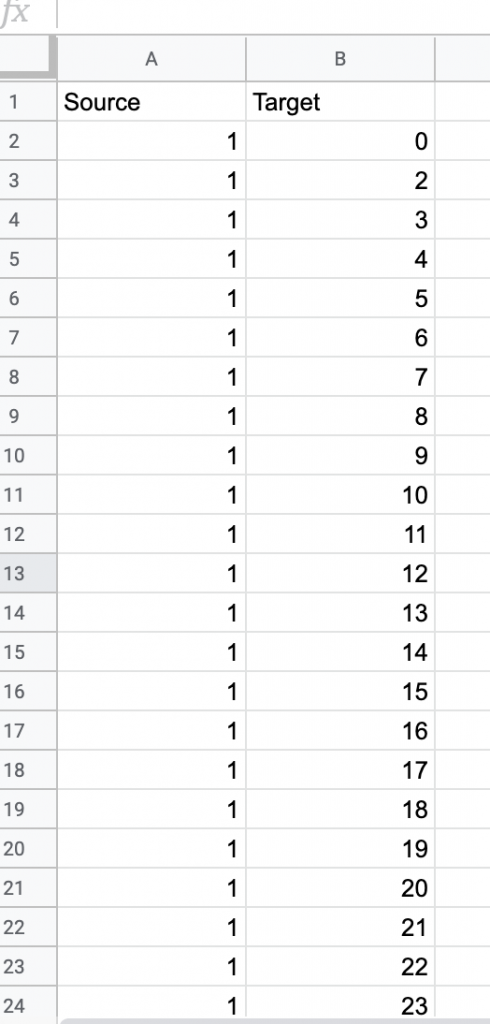
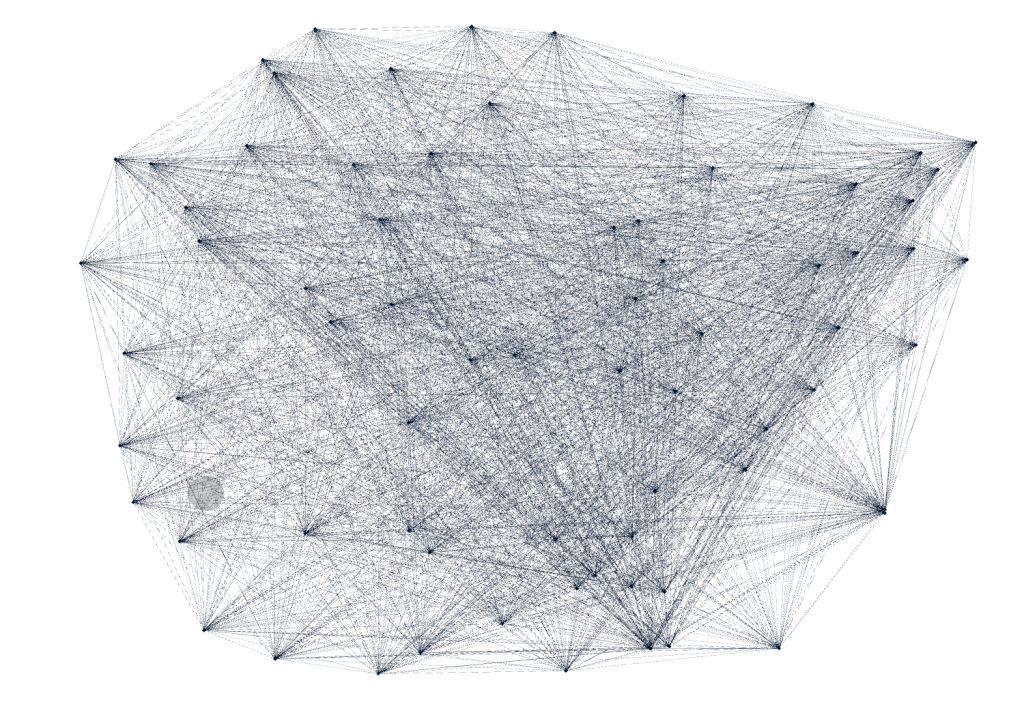
For this assignment, I wanted to see the relationship between major and home state of my teammates on the rowing team. I was curious if there was some sort or relationship between these attributes, but also if any particular members were more connected than others. I started by creating a node table of every member of the Bucknell Women’s Rowing team from the graduating years 2019-2023. Unlike other visualization platforms, I had to sort through my data and organize it to show the nodes in the simplest way. I then created the edge table which connects every person on the team, each node, with each other on the common connection that they are or have been all on the rowing team. This process was particularly difficult for that I had to go back between the Google spreadsheet and Gephi to make sure all of the nodes were connected correctly, and there was not any extra connections. As I found out by doing this, “it is easy to become hypnotized by the complexity of a network, to succumb to the desire of connecting everything and, in so doing, learning nothing” (Graham 201). By not analyzing and sorting out the network, my visualization was crowded and nearly impossible to read.
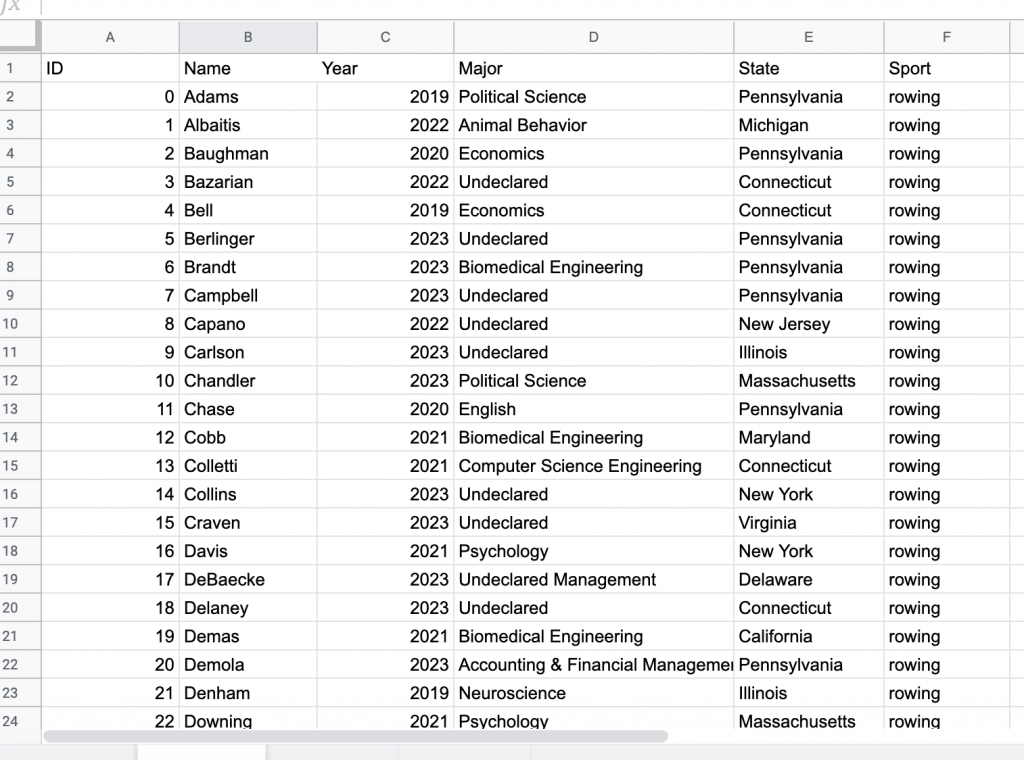
Figure 1: All nodes connected to one another.

As Graham mentioned, by having every node connected, it is very difficult to learn anything about the dataset. I wanted to look at degree for that “in fairly small networks, up to a few hundred nodes, degree centrality will be a fairly good proxy for the importance of a node in relation to a network” (Graham 217). However, because each node is connected to every node only once, every node at the degree of 72, so every edge have the same weight of zero. And for this same reason when I ran the statistics test for modularity, it also came up with zero for that each node is connected in the exact same ways. This made analyzing the information a little bit more difficult.

Lima states, network visualization is “a potential visual decoder of complexity, the practice is commonly driven by five key functions: document, clarify, reveal, expand, and abstract” (Lima 80). I wanted to document the potential relationships within my rowing team on the attributes of Name, Graduation Year, Home State, Major, and Sport Team. To clarify the data I played with the different attribute filters and partition coloring. By doing this, I revealed that there is a very strong relationship between Winter, Martinez, and Keating, which could be potentially be expanded in a larger, more focussed project, and possibly use it as an abstract representation for some larger connection.

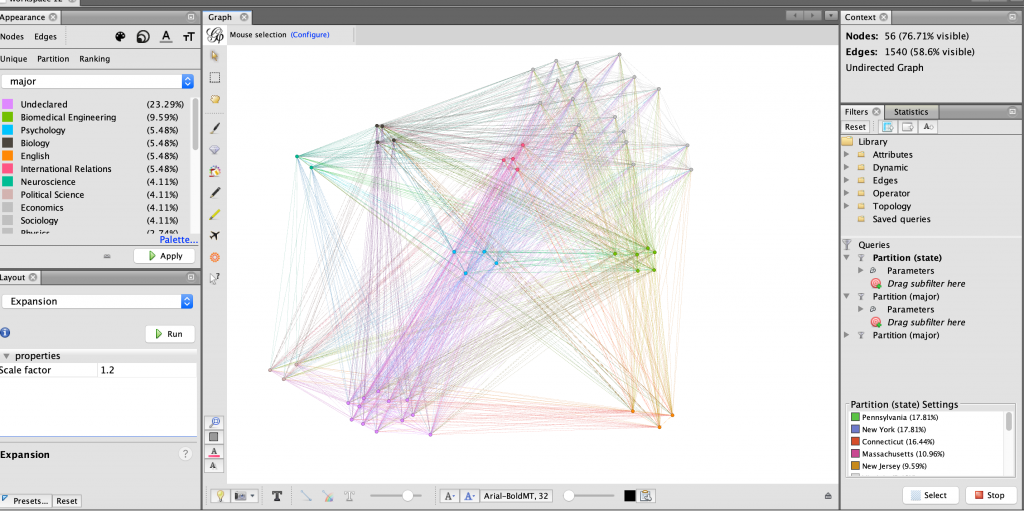
I started analyzing the data by partitioning the data by home state and generally grouped the nodes accordingly using the dragging tool, as seen in Figure 2. This proved to show that much of my team is from the North-East United States. I then partitioned the every member’s major, keeping the grouping as home state to see what they most common majors were within the team, and possibly within certain states. As seen in Figure 3, the partitioning in this way did not show very much. I then filtered the data in Figure 4 to display only the nodes with states within the north-east.
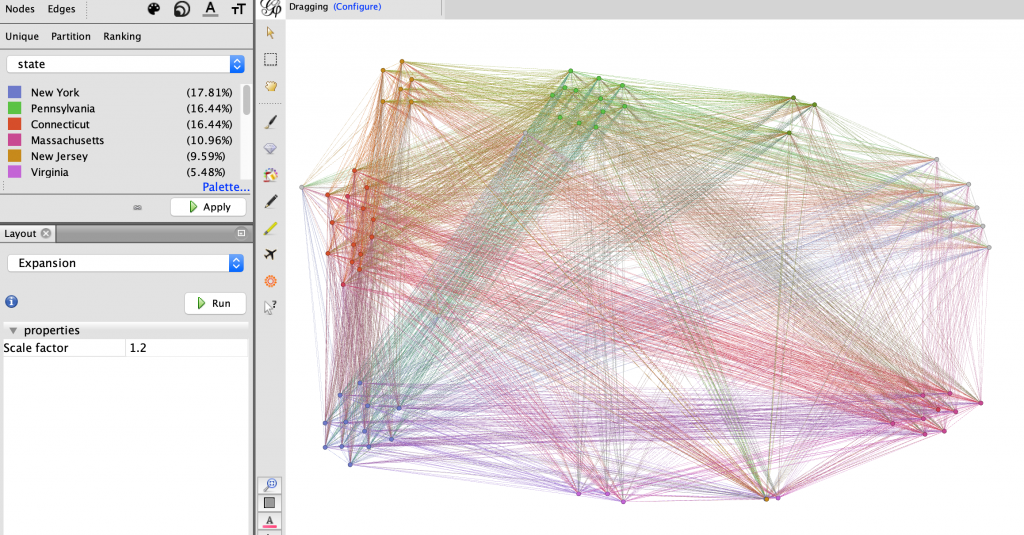
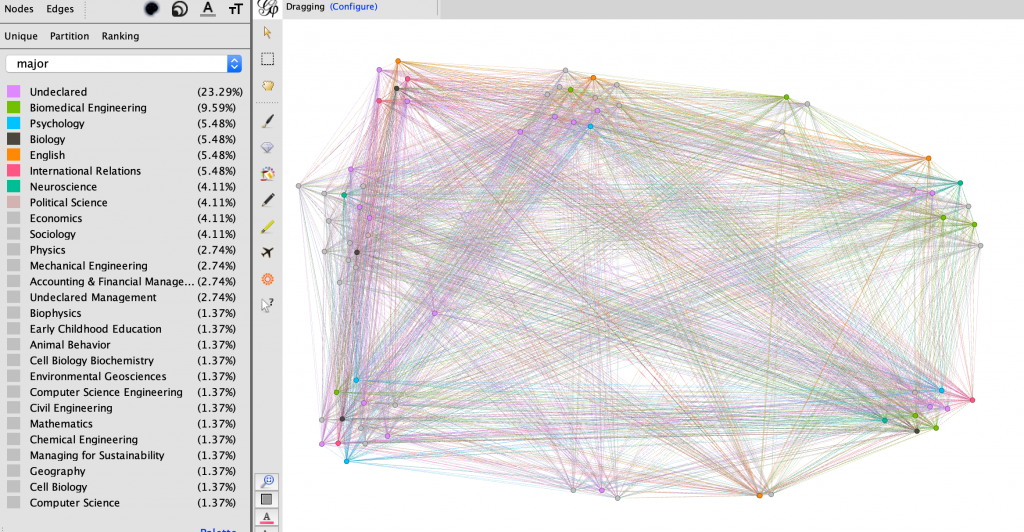
Figure 2: All nodes partitioned by home state
Figure 3: All nodes partitioned by major
Figure 4: Only nodes within the North-East, partitioned by major

After seeing only the nodes in the north-east, I further filtered the data to show only the top two STEM majors on the team, Biomedical engineering and Biology. I thought that there might be a relation between those living in the north-east and their likelihood of being a science, technology, engineering, or mathematics majors. In Figure 5, I showed this relationship using the Circular layout. I then became curious what states these women were from, so I used the same layout and filters, and in Figure 6 I changed the partition color to states in the north-east instead of major.
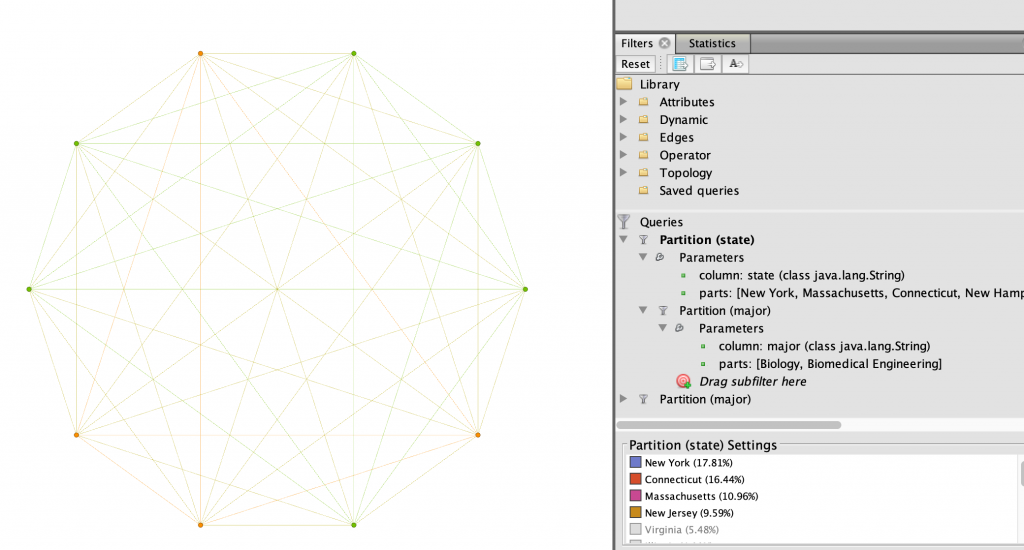
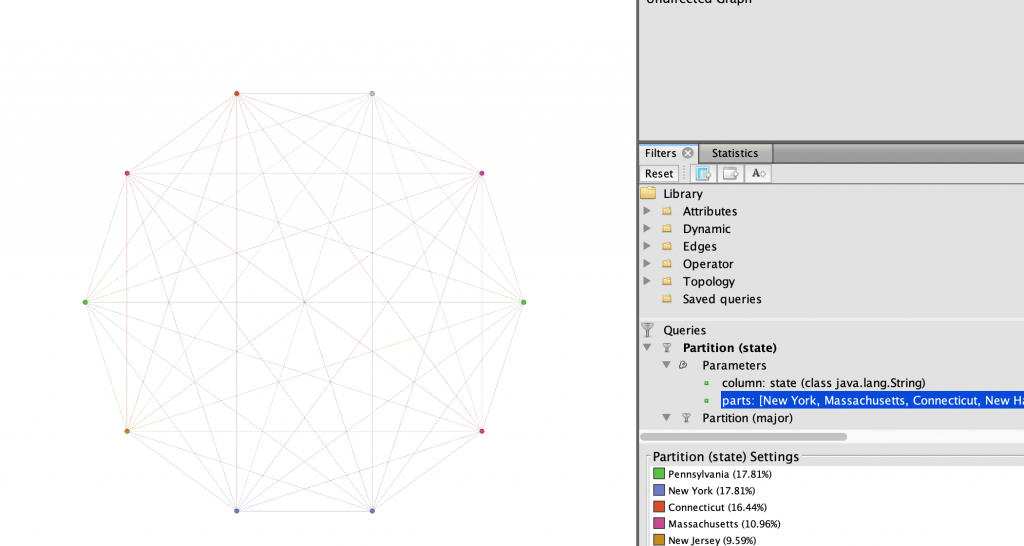
Figure 5: Biomedical and Biology majors from the North-East, partitioned by major
Figure 6: Biomedical and Biology majors from the North-East, partitioned by state

I wanted to further expand which of my teammates had the strongest connections in terms of what region they were from and their majors. I filtered the state parameter even further to only include the tri-state region of New York, New Jersey, and Connecticut. This revealed to me in Figure 7 that three of the four women who were from this particular region are Biology majors. Thus allowing me to find that there is a very strong relationship between Winter, Martinez, and Keating.
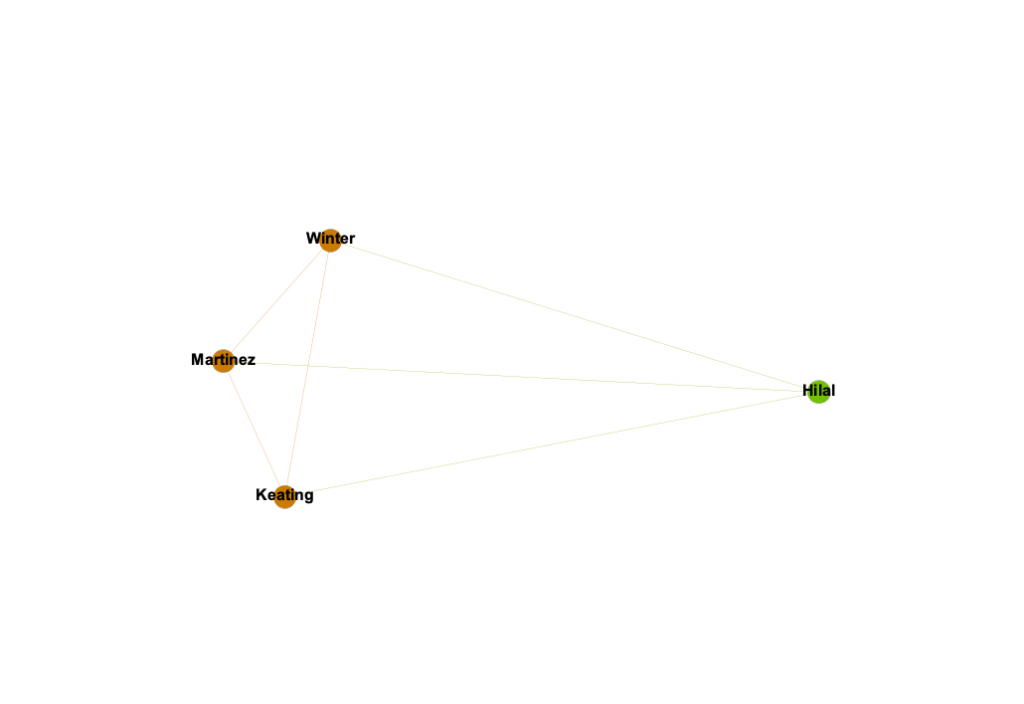
Figure 7: Biomedical and Biology majors from the tri-state area

Through learning Gephi I have found it to be extremely useful in displaying relationships between nodes. The filtering, color and size partitions, and layouts were ideal in customizing the network in a way that is visually appealing and highlights the important information being shown. However, one thing that Gephi does not do unlike other platforms we have used this semester is the ability to change the edge relationships easily. At times I wanted to have the edges connect nodes with the same state attribute, or major, but I found it to be more difficult that worth. How I created my edges was simple, however still took close to an hour to create the edge table for it in a spreadsheet. Interacting with the dataset at the spreadsheet phase was new and quite a learning experience in comparison to the other visualization platforms we have used, which were given to us in the way that worked with the software. Overall, Gephi is fussy to work with, although in the end it is all worth the beautiful networks that can be created.
Categories
Assignment 3

Assignment 3

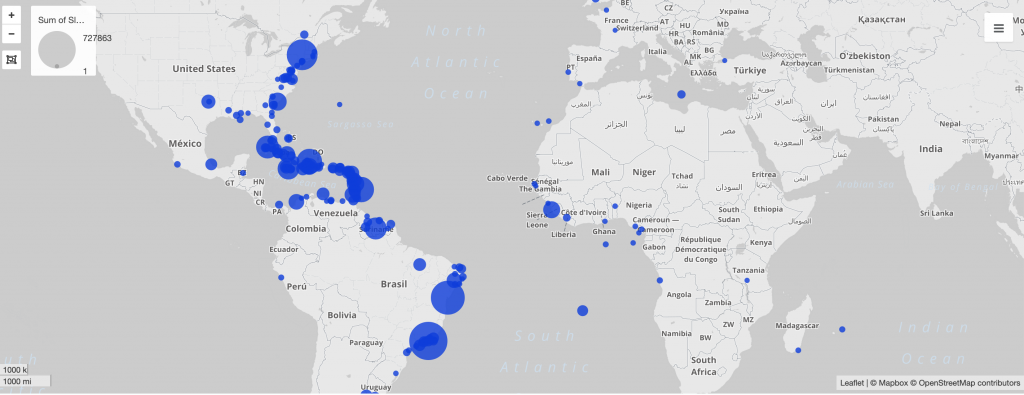
Using the Trans-Atlantic Slave Voyages dataset, I decided to look at the relationship between the European colonial powers, the largest ports for slave disembarkation, and the years in which the most slaves landed at them. After first looking at the dataset, I saw that Bahia and Rio de Janeiro both had the largest number of slaves land at them, and I hypothesized that there must be a reason for Brazil to need such a large number of slaves, more than any other region. 

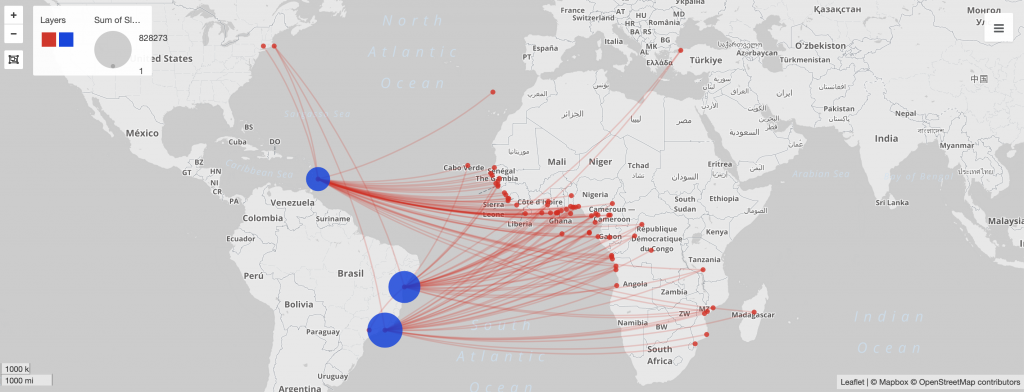
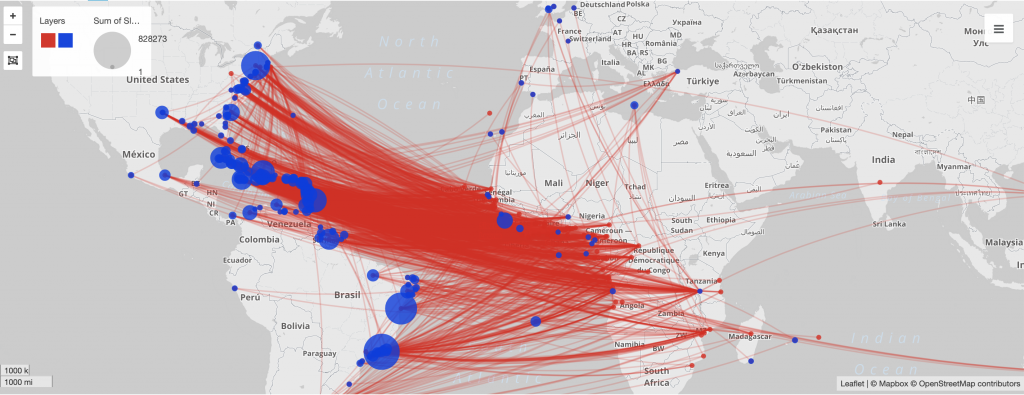
In Palladio, I used the dataset to not only map, but put a timeline to the connections between Portuguese colonies and the number of slaves entering into them. Figure 1 displays the relative number of slaves that arrived at each port, and where those ports are. I then mapped in Figure 2 the connections between these landing places with the place of purchase for each slave, which produced a map that proves that the majority of the slaves in the Americas were bought from African colonies. I then narrowed in to looking at the largest landing ports, those of which were in Portuguese colonies, and took a closer look at where exactly those slaves were being purchased in Figure 3.

Figure 1: Landing sites of slaves sized to number arrived at port
Figure 2: Place of slave purchase to landing sized to number arrived at port
Figure 3: Place of slave purchase to major landing ports in largest Portuguese colonies

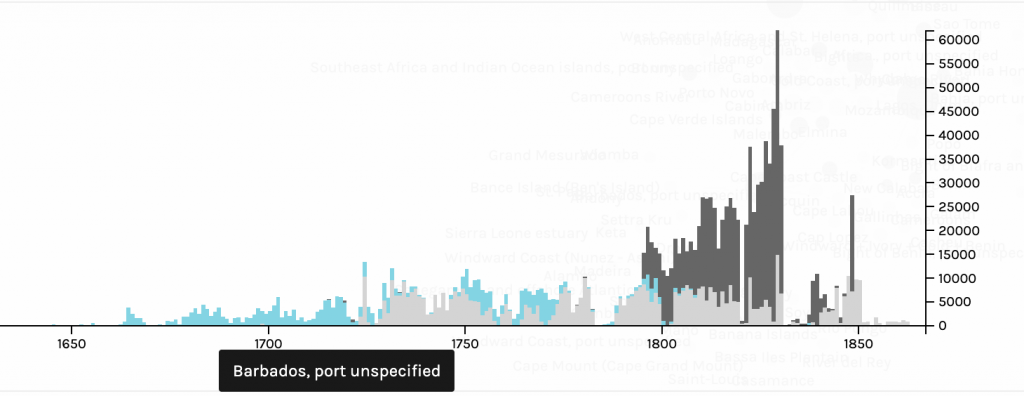
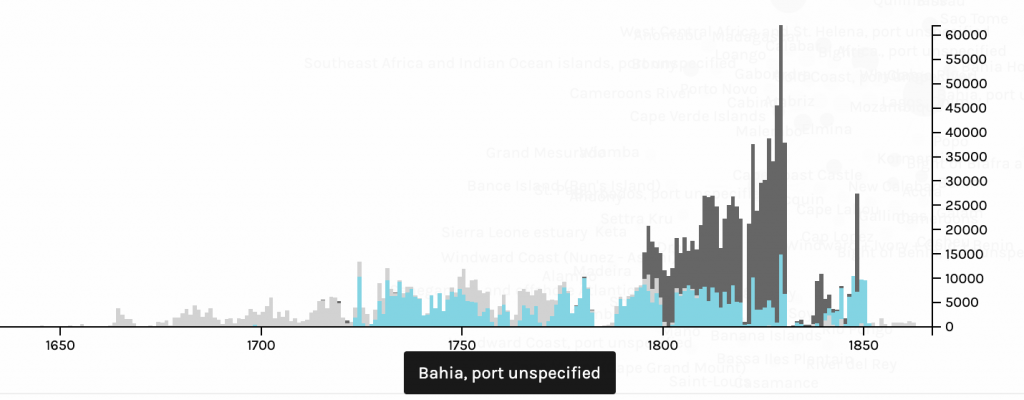
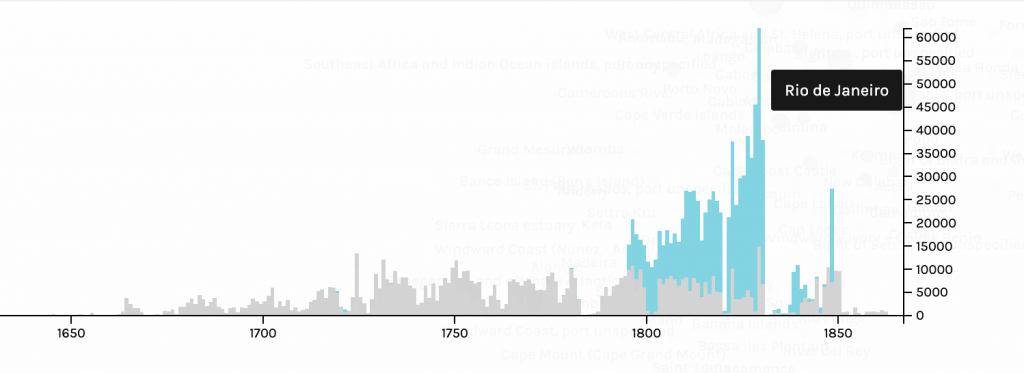
After looking at what ports received the most amount of slaves, and finding out that many of them indeed come from the Western coast of Africa, I wanted to put a timeline to the Atlantic slave trade between Portugal and Africa. In Figures 4, 5 and 6, I highlighted the number of slaves that each landing port had between the years 1650 and roughly 1880. In both the ports in Brazil, Bahia and Rio de Janeiro, there was a significant spike in the number of slaves arriving in the late 18th and early 19th century. I wanted to find the reason for this, and after looking in to it I found out that not only did Portugal have a colony in Angola, a major slave trading colony, that there was a boom of gold fields that were discovered in Brazil in the 18th-early 19th century. More slaves were needed to work in the fields, which resulted more slaves being imported to Brazil through its two major ports, Bahia and Rio de Janeiro. As seen on the timeline, there is a sharp decline in slave trade in the mid 1800s, which can be further explained through Brazil abolishing slave trade in 1851 and then Portugal closing the last Trans- Atlantic slave trading route in the late 1800s.

Figure 4: Number of slaves landed in Barbados per year
Figure 5: Number of slaves landed in Bahia per year
Figure 6: Number of slaves landed in Rio de Janeiro per year

Visualizations are able to explain datasets and bring out patterns in them in a way that an excel spreadsheet is unable. The type of visualization greatly affects what information will be extracted from data and how it will be perceived by viewers. As Drucker states, “the means by which a graphic produces meaning is an integral part of the meaning it produces” (Drucker, 239). This idea is essential in making visualizations from datasets. I was able to display the pattern between Portuguese colonies and their large influx of slaves imported in the 18th and 19th century by using mapping and timelines to visually make the key patterns pop out to the viewer. Without mapping and the use of a timeline, the connection between Brazil, a Portuguese colony, Portugal, Angola, and the boom of gold fields would not have been made.

Categories
Assignment 2

Assignment 2- Slavery Data Visualizations

Using the Slave Names database, US Slavery in the 1860s and Slave Narratives, I created six visualizations that are meant to display the journey many slaves took to the new world. I did this through looking at words that are associated with traveling and the hopes and also the realities it embodied for these people.

Voyant Visualizations

This wordtree with ship as the root word shows that the words most commonly associated with ship include those such as, merchant, gun, slave, and large. These word associations allow us to draw conclusions what the text was about and what might the person writing it was experiencing.

This bubbleline displays where in the seven texts are the words ship, captain, and freedom are located and the occurrence of them. As seen, a few of the texts barely mention these words, however in Olaudah Equiano’s writing it is shown that there is a chronological connection between talking about a ship, a captain and freedom.

A link visualization, similar to that of the word tree displays a network of words that are of higher frequency and words that are in high proximity to one another. In this case, the words in blue, the root words, are connected to words that are commonly associated which we can look at to determine what freedom meant to the author, or that time was a large aspect of being on a ship and gaining freedom.

Tableau Visualizations

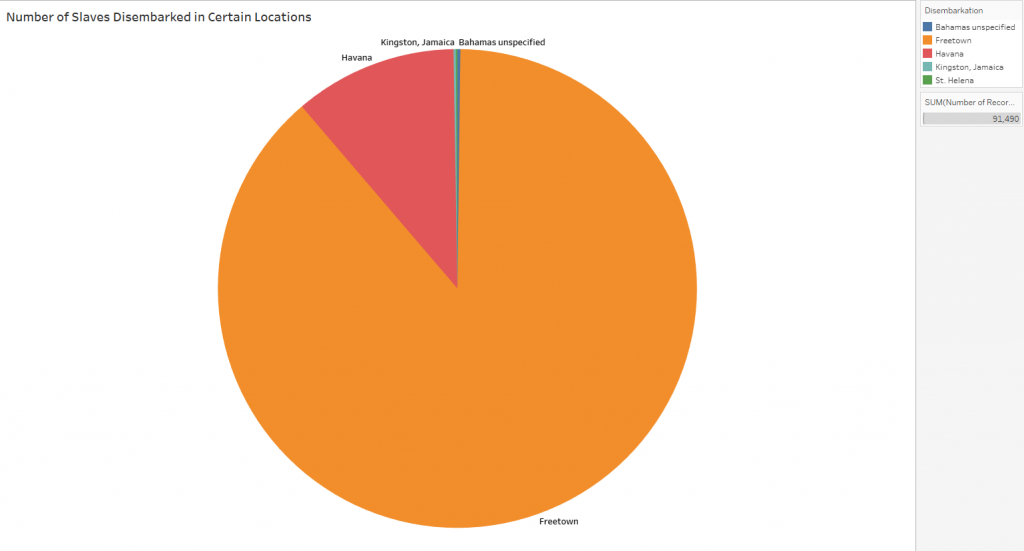
The slaves that were accounted for in the dataset disembarked in one of five places, and this pie chart visually displays the large number of slaves that disembarked in Freetown and Havana. The stark differences in numbers allows readers to draw conclusions that many more slaves must have been present in Freetown, or that there was a mistake or bias in the data.

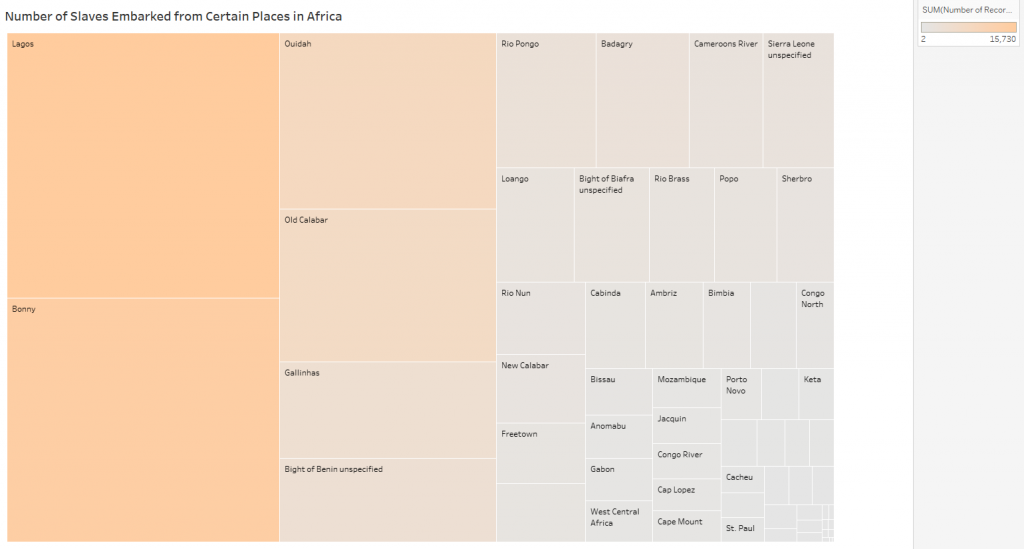
This tree map displays the places that slaves embarked from, and the concentration of slaves from that place. The color and the size of the rectangle display the concentration, showing that some of the areas of Africa were affected more than others.

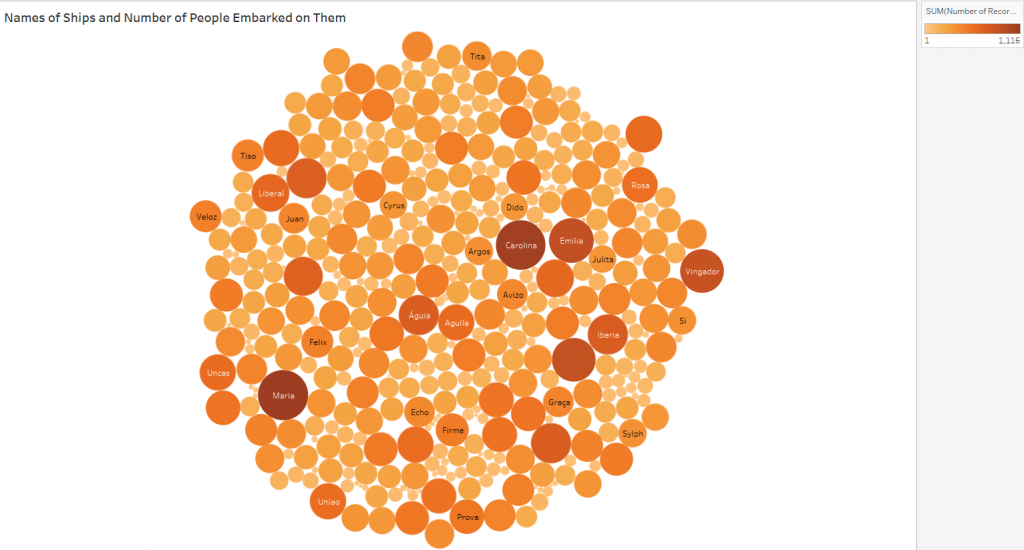
Similar to the tree map, this packed bubble chart shows the concentration of slaves who embarked on certain ships. Seeing the data in this way it is easier to see that many of the slaves who were accounted for were on a few major boats, or that those ships were much larger than others.

Comparison

Voyant is a platform that analyses qualitative data and creates visualizations based on them. Tableau is similar in that it creates visualizations of data to make it easier to view and understand, however it looks specifically at quantitative datasets. Voyant is able to look deeper into the written words of authors and analyze biases and backgrounds and how they might affect the writing and content of texts, where tableau is able to look at numbers and make assumptions based off of looking at relationships of numbers.

Visualization Practices

The creation of interactive visualizations and construction of text corpuses has verified Tanya Clement’s observation that visual platforms allow for greater insight, vantage points, and authenticity of data because they bring new light to datasets that cannot be seen by looking at numbers of texts in a spreadsheet. They can highlight relationships between variables that seemingly are not related prior, but indeed draw interesting conclusions. Defamiliarizing and deconstructing texts is helpful in creating a multidimensional viewpoint, looking at more than just the words on a page, but what they mean and why they are used. Digital visualizations do not simplify the data, it makes it easier to understand and analyze, showing immutable truths.

Categories
Assignment 1

Assignment 1

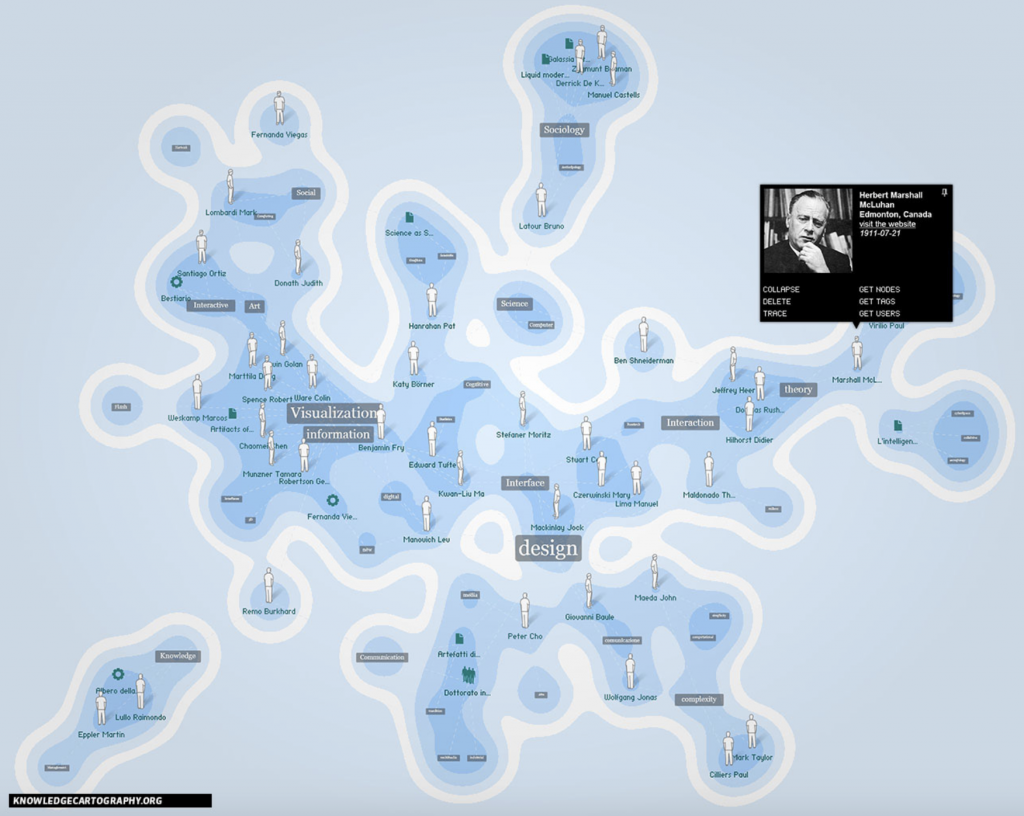
I chose this first visualization for its combination of cartography and knowledge. It is a system of representation of space, which communicates complex contexts through overlapping texts and diagrams.

Image 2

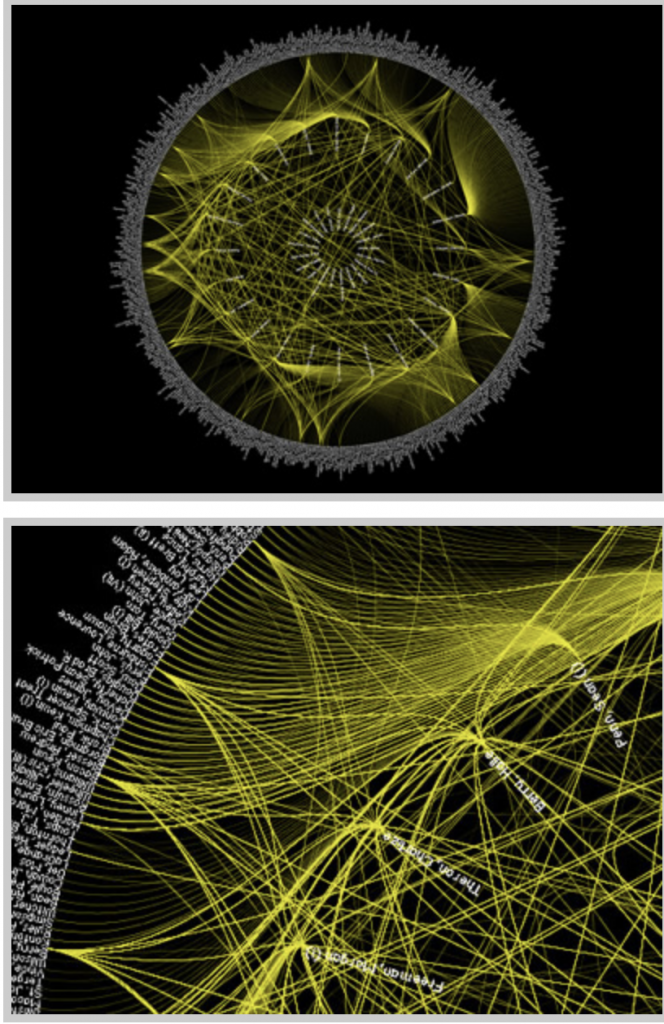
This visualization of the patterns between Oscar winning actors, directors, and other actors that they work with. I chose this visualization to analyze for that it displays information that is accessible to the public, however difficult to display into one visualization due to its complexity of rings and spokes.

The first image of the history of visualizations using knowledge cartography is a dynamic visualization for that once you click on the different texts it further information pops up. The second visualization is static, and is one large visualization that displays all of the Oscar information in a single graphic. Static visualizations, many being “infographics are worthy of reflection and study on their our term”, due to the multiple aesthetic dimensions (DuBois 15). Data in both examples can be interacted with and viewed in different perspectives depending on what parts of the image is being highlighted, and information being focussed on. The network thinking that both visualizations use “are giving way to new ideas that are able to address the inherent complexities of modern society” (Lima 69). Material is better understood and learned through visualization, and these networking and mapping strategies contribute to more complicated information being shown.

Digital Humanities Sample Book

Image 3

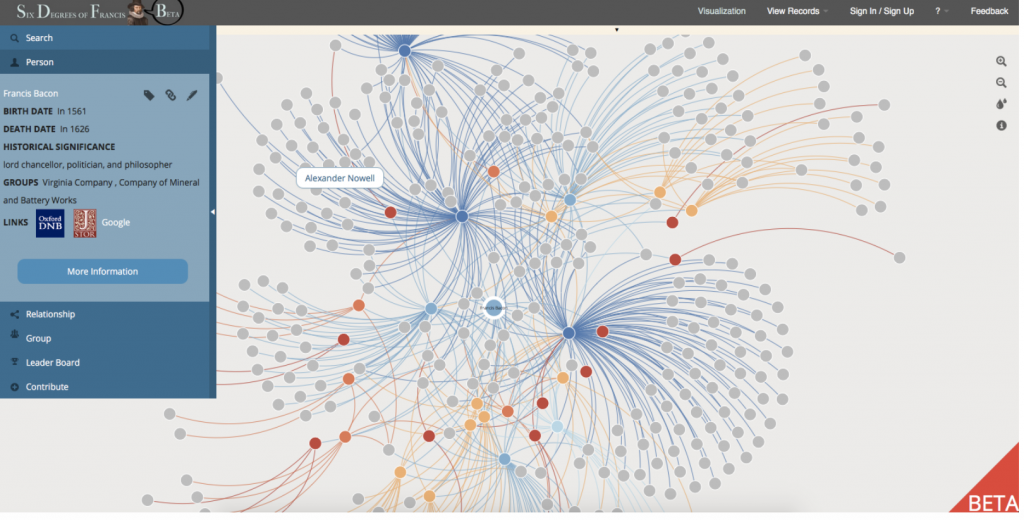
This visualization from the Digital Humanities Sample book called The Six Degrees of Francis Bacon. I chose this for its obvious use of tree hierarchy to display the important information and have leaves and branches off of the main points. This is a dynamic visualization for that is moves with the viewer and forms to what information is being analyzed. As” Newman describes trees as a connected, undirected network that contains no closed loops… a tree is considered a connected network because every node can access any other node by following a path” (Meirelles 57). This is important in being able to interact with the data in different ways by scanning over and clicking on different points. This dynamic and interactive visualization allows viewers to interpret the information differently and understand material in ways that others may not, and only focus on what material deems to be important.

Image 4

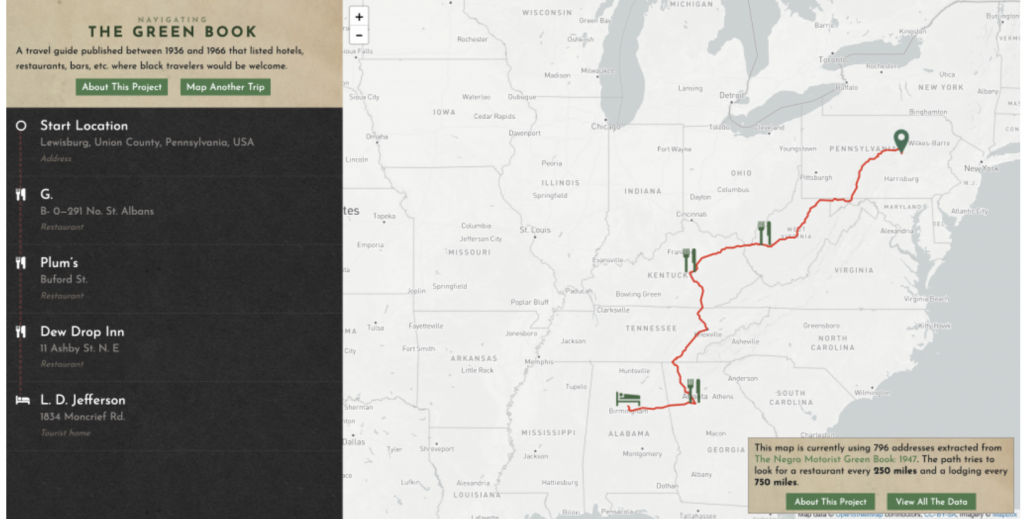
Navigating the Green Book is an interactive site that allows its viewers to visualize the 1900s Green Book. I chose this for that it was unique in that one could enter any addresses and find where an African American could stop to eat or sleep. This is a highly dynamic visualization for that one must enter in locations to find out more information. Different locations brings different results and new material. This display not only allows viewers to bring up their own location, but they can also click and get information on the icons or look at a particular city and all of the friendly places in it, not just on route. Because “many of the problems that individual people face are often the result of larger systems of power, but they remain invisible until those people bring them to light”, this site brings these problems to light by creating room for different viewpoints and using cartography (Klein). By having a mapping service that is easy to use and similar to other navigating apps, people are introduced to the data in a familiar fashion, instead of in a visualization that people do not know how to use.

Categories
Practice

Practice Blog- Data Literacy

Being able to read, interpret, and manipulate data is an essential skill in being able to create data visualizations. Dubois discusses in his chapter that a good visualization design can be used to communicate across cultural boundaries to display information. Data literacy is also necessary for understanding digital visualizations that are made from data sets. Without basic data literacy people would not be able to gather and understand information on public issues. A well designed data visualization, along with data literacy, the understanding of new information on issues can be expressed more easily between people and cultures.

There has to be data literacy on both sides of visualizations, the people who are making them, in addition to the people who are reading them. If one party is unable to accurately read a data set, then the information on a visual can be misinterpreted by the reader, creating false news.

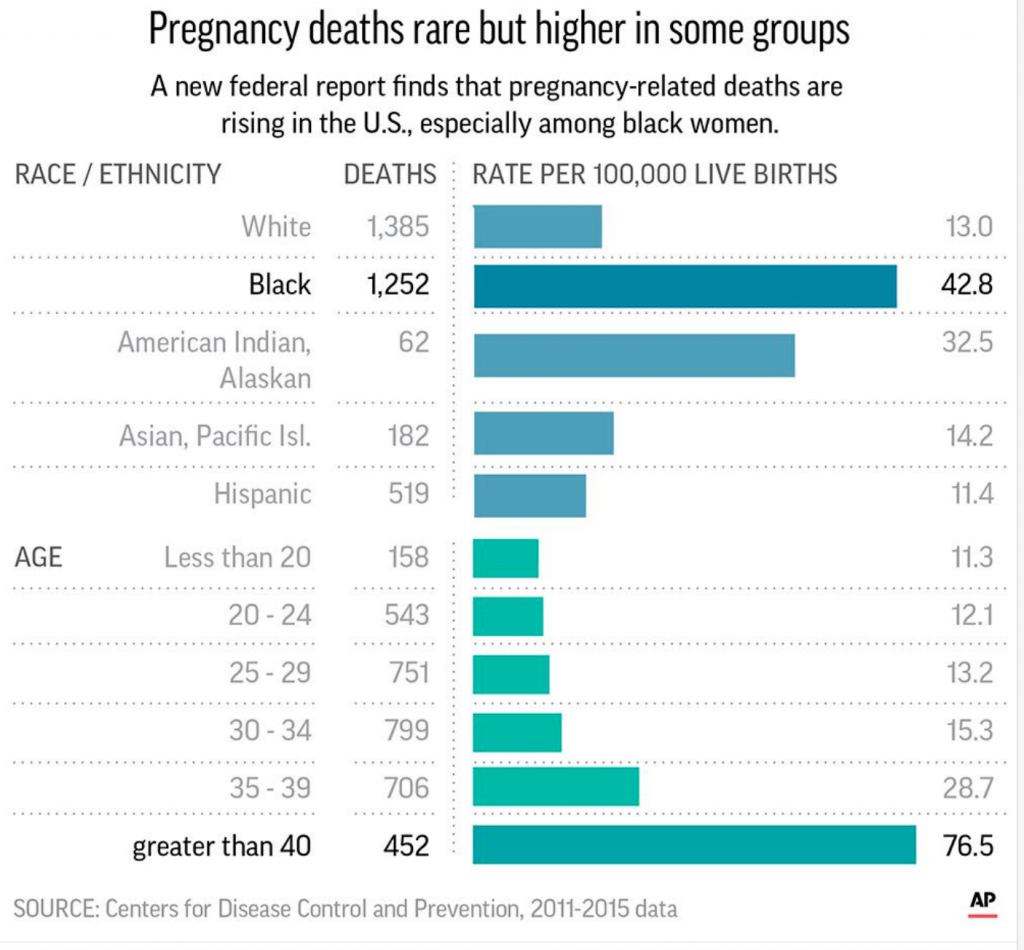
Below is an example of how someone who has done a poor job displaying data can ultimately enhance the odds of a reader misinterpret a federal report on a public issue. The Center of Disease Control and Prevention released this bar chart on pregnancy deaths rates between different groups of women to show that deaths related to pregnancy in black women is rising. However, due to how it scaled the bars, it makes readers believe that there are just as many deaths for black women as there are for women giving birth over the age of forty, which is simply not true. Data literacy in this case would be able to stop this confusion and creation of false information.

A badly created bar chart using data from Centers of Disease Control and Prevention. https://viz.wtf/

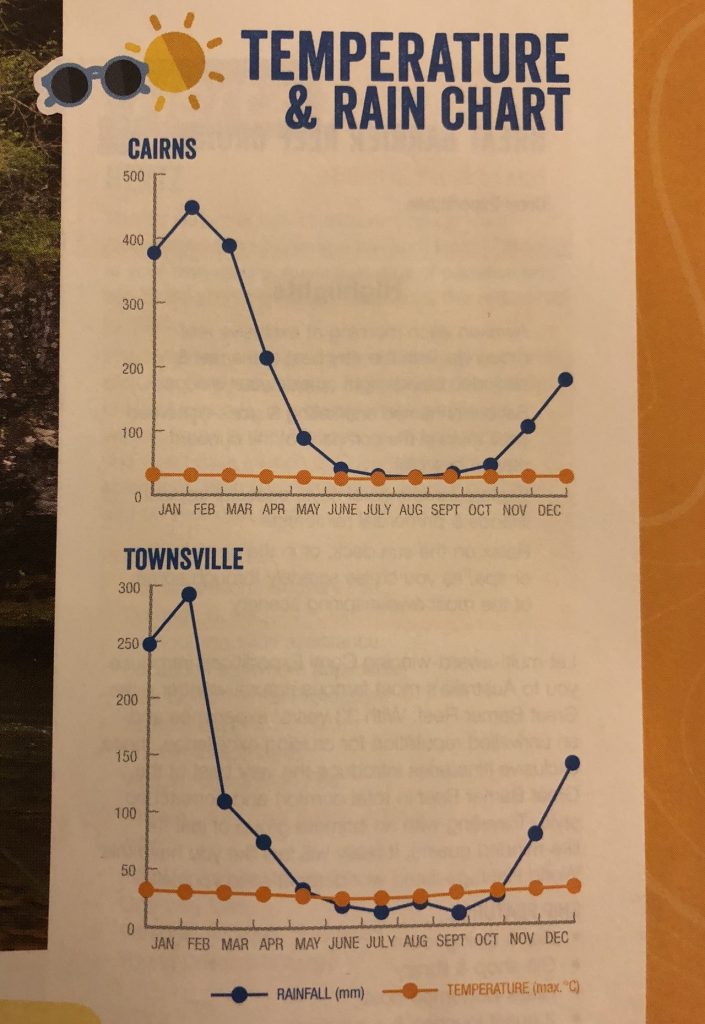
The Temperature and Rain Chart below from https://viz.wtf/ also displays how data literacy is absolutely necessary in creating visuals to display basic information in a simple manner. Having two set of information being shown on a single y-axis is confusing for readers to interpret. As seen below, it looks as if the temperature never changes throughout the year, but the amount of rainfall drastically does- this is not the case though. The scale does not fit both variables. If the person who made this chart had a stronger knowledge on data literacy, then the trend that the data showed between temperature and rainfall could have been displayed and gathered by readers.

A poorly made rainfall versus temperature chart https://viz.wtf/