I used the 1806 Slave database, the slave voyages database, and the African names database to create six unique visualizations to showcase important information that might otherwise be hidden, especially if one were to use a close reading method. The African name database and the 1806 Slave database both required a significant amount of “data plumbing” in order to move them into a state in which they can easily be visualized. With both of those visualizations, manual data modification was necessary to match the entries in Tableau to a physical location, because some of them were unknown or, in the case of the African names, they were locations that have changed names or no longer exist.
Voyant
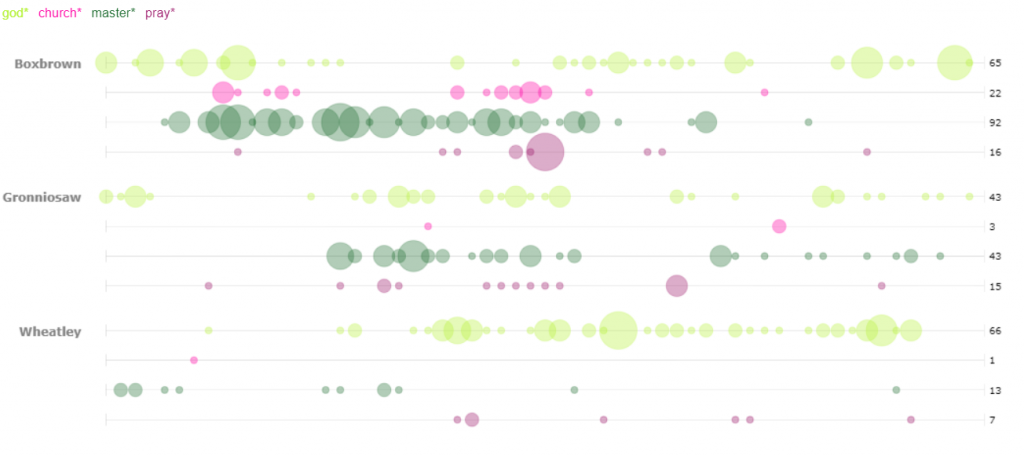
For my first visualization in Voyant, I decided to use the bubblelines tool. I used the keywords God, Master, Pray, and Church. These were plotted for several of the stories across the length of the story. I was not surprised by the small correlation between the usage of God, Pray, and Church. However, I was surprised to see that many of the occurrences (not necessarily the high density occurrences) of the word “pray” were also closely accompanied by the word master. Looking deeper into the texts I only found one example of an explicit prayer for a master, however the singular existence leads me to wonder if many of the slaves in these narratives prayed for their masters. I was also struck by the minimal usage of the word “master” in Wheatley as compared to one of the other two narratives, particularly Boxbrown.
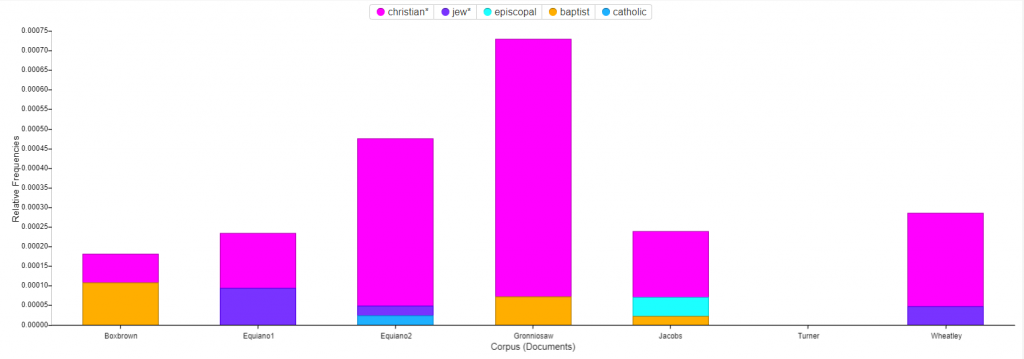
For the second Voyant visualization, I was interested to see a breakdown of the religions mentioned in the narratives. The stacked graph easily portrays the dominance of Christianity as compared to the rest. I was puzzled by the fact that Turner has no mentions of religion at all in their story. In order to find mentions of the various religions I utilized two methods. The first was brute force guessing of many of the common religions which yielded all of the entries shown except for one. In order to find that one, I used a word tree centered around the word “Church”. With a wide context setting I was able to see all of the religions that I had found by brute force in a neat list, along with the additional entry that I had not considered, Baptist.
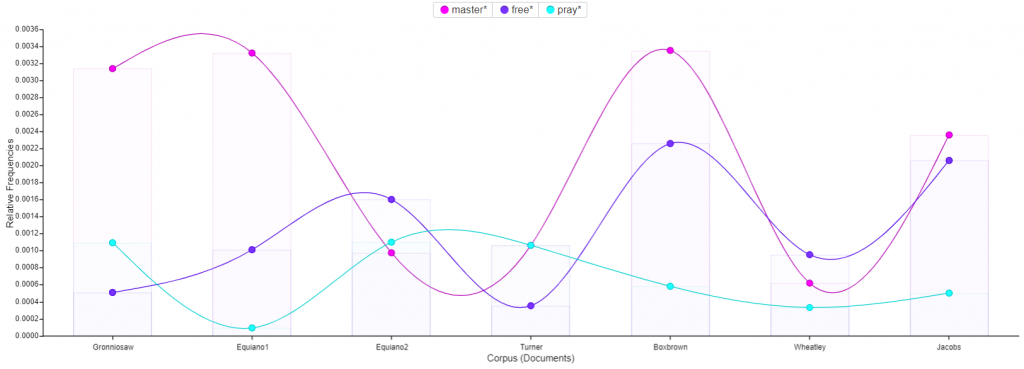
Next I utilized the trends tool to track the usage of the words : master, free, and pray across the corpus. The most interesting find from this visualization was the small inverse correlation between the usage of the word pray and the usage of the word free. For several of the texts, one of the two words has a high frequency and the other has a low frequency. This could suggest that slaves who talk more about freedom pray less, or conversely slaves who pray more talk less of freedom.
Tableau
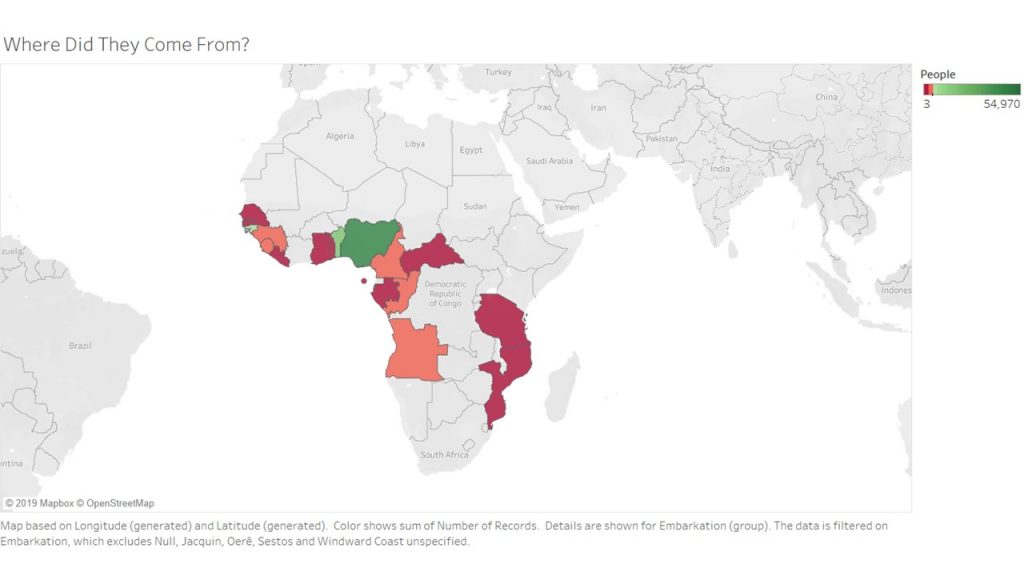
For my first Tableau visualization, I mapped the embarcation locations of the slaves. The countries are highlighted to indicate where people came from, and colored to indicate the number of slaves who came from the area. This visualization was tricky, because I had to do quite a bit of research to match some of the old African countries and regions to their modern day locations. There were several locations that I had to filter out entirely because they did not produce any results when searching for them. After that plumbing was complete however, the visualization shows the fact that many of the slaves come from the coasts of Africa. Considering they traveled by boat, this makes sense.
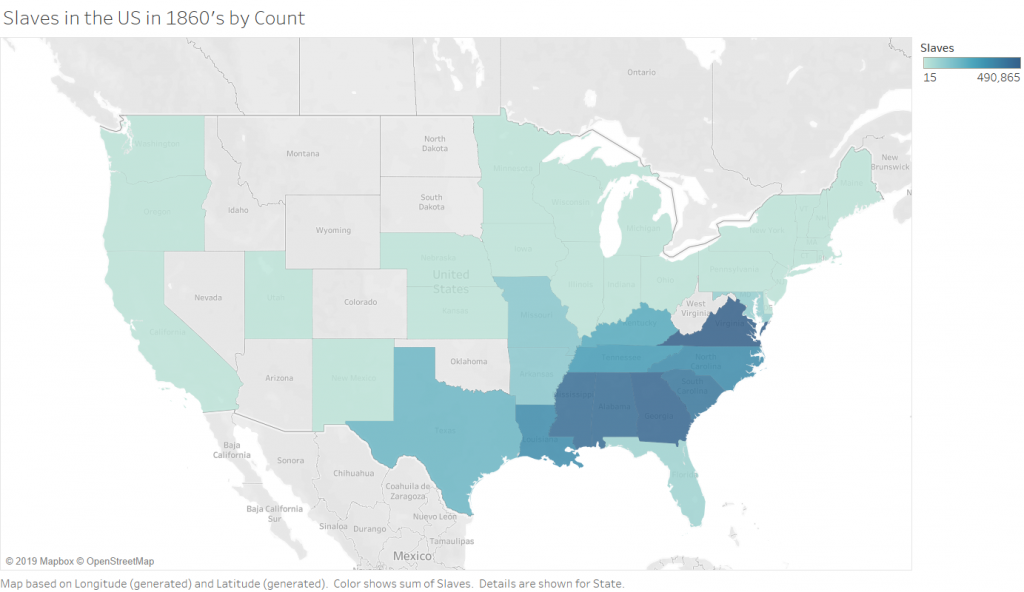
The Second (2 maps) visualizations in Tableau are 2 maps of slave populations in the united states, which I have broken down by state (I chose state over county purely for aesthetic reasons, and because this choice did not impact the ability to show the story that I wanted to show). Comparing the two maps leads to the discovery that not all of the locations that have the most slaves also have the highest population of slaves. There are a few states that are outliers and have smaller numbers of slaves but a higher percentage. There are, of course, still some states (Virginia and Georgia) which are high in both raw number and percentage. This visualization allowed me to play with the calculation feature of Tableau, which is incredibly powerful because you can write equations to format your data into any form you need.
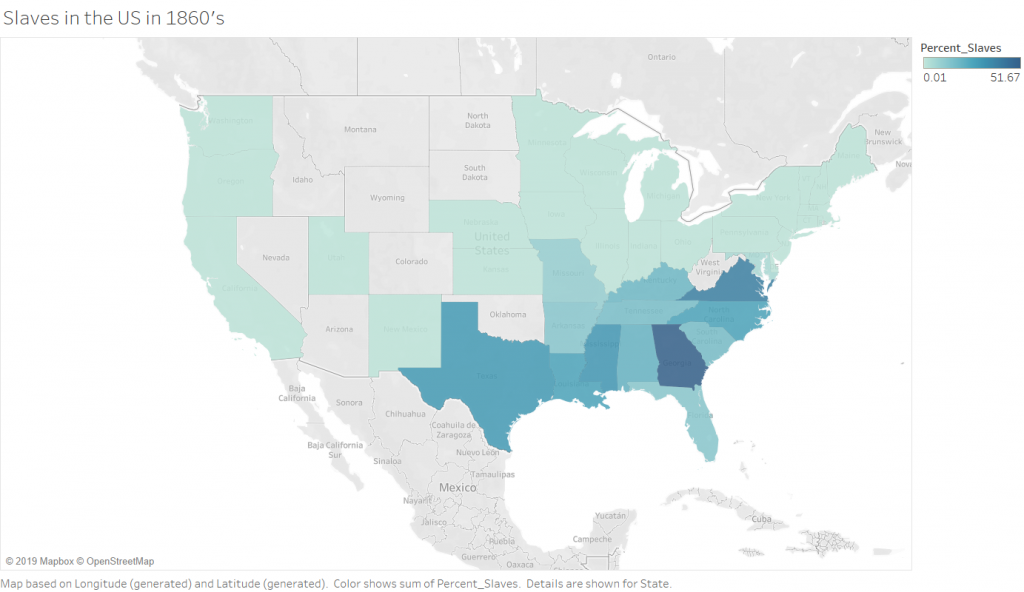
Percentage of Slaves in the 1860’s by State
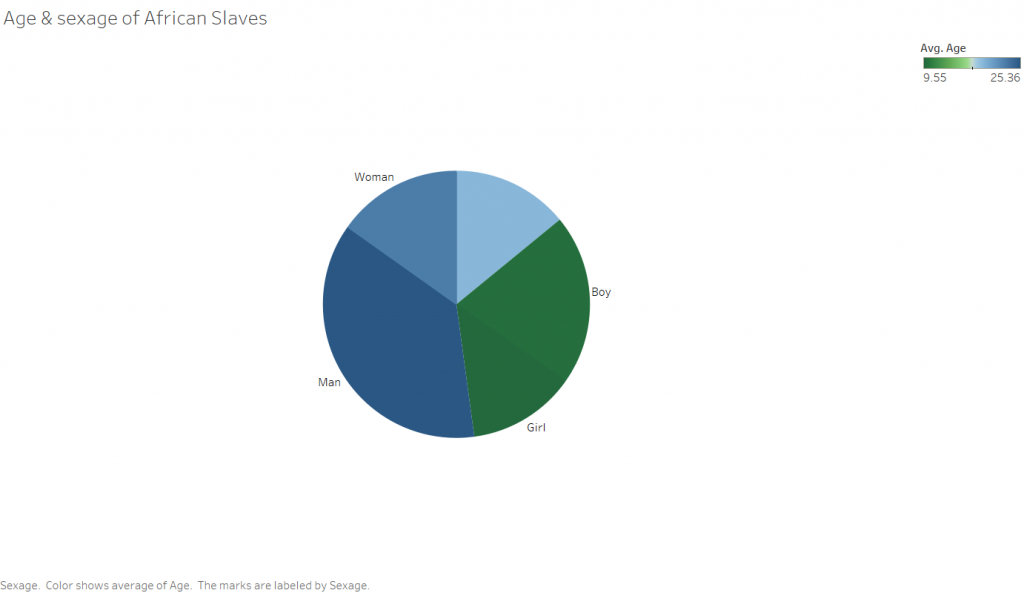
The third rather simple Tableau visualization is a pie chart showing the sexage of the slaves. The angle of the slices is determined by the number of people in that particular sexage, and the color corresponds to the average age. I was surprised with this visualization that there were so many records missing for sexage. This leads me to wonder how this data was collected, and ask why someone didn’t simply makeup a sex for the unknowns as I would expect to happen in a situation where someone has to enter a large amount of information into a database of some kind, be it a paper one in this case or a computer in modern days.
Between the two platforms, I certainly prefer Tableau. Both programs are able to take in data and output visually appealing representations of the input, however Tableau is far more customization. This does not provide the full picture however. The two are designed for completely different purposes. Tableau excels at visualizing numbers and quantitative data that characterizes something qualitative, such as the number of individuals who are male or female. Tableau does not do a very good job with qualitative data such as text. That is where Voyant comes in. Voyant is excellent at analyzing corpuses of text and breaking them down so that you can get a “zoomed out view”, or a quantitative view of something qualitative. Tableau’s “Show Me” pane makes easy the process of determining what type of visualizations are available to depict the story you are trying to tell about the data. This is especially helpful if you have a pattern that you want to show, but are not sure how to show it. While Voyant does not suggest the types of visualizations that would work for your particular data, it does allow you to quickly play around with all of the tools in its arsenal, allowing you to get an idea of they tool’s capabilities relatively quickly.
The ability to step back from a dataset and visualize something about it as a whole is incredibly powerful, and only made more powerful with tools that allow for quick and easy close analysis of a phenomena found in a distant reading. The example I would propose for this (though not related to DH in the least) is in the form of a lateral thinking puzzle I recently read, which asked why a corporate database was analyzed to find that a customer was four times as likely to have their birthday on any of the following days than on another : February 22nd and November 11th. This would be the distant reading of the dataset, finding the significant phenomena that so many customers have birthdays on certain days. The closer reading finds that the dates, entered in numerical format are “11-11” and “2-22”. The store clerks were simply lazily punching numbers into the system rather than asking customers for their birthdays. Without a closer reading of this problem, one could form the conclusion that those are lucky days to have children, and indeed it is more probable that a given person will have their birthday on one of those days. The closer reading here provided the reasoning behind the phenomenon. This ties into Tanya Clements work, in that she suggests that the DH gives wide perspectives that are necessary to be able to grasp new and important information about texts. She also talks about the balance provided by close reading techniques.
